
Alexandria Serra1
13 Stetson J. Advoc. & L. 1 (2026)
Contents
- Abstract
- I. Introduction
- II. How AI-Driven Trial Coaches Work
- A. What is Generative AI?
- B. What Can Trial Coaches Do?
- C. Why Do AI-Driven Approaches Fit the Students We Teach?
- D. Committed Faculty: The Cornerstone of Effective AI Integration
- A. Adaptive Feedback and Ongoing Improvement
- B. Privacy and Safe Experimentation
- C. Enhancing Trial Strategy with Simulated Feedback
- D. Increased Engagement and Active Learning Through Gamification
- E. Preparing for Practice
- IV. Trial Advocacy Use Cases: What We’ve Done So Far
- V. Integrating AI Tools Into a Custom Curriculum
- A. Initial Setup
- C. Testing
- D. Feedback Process for a Custom GPT in a Robbery Case
- 2. Provide Correct Information
- VI. Challenges andConsiderations
- A. Guardrails
- B. Professor Training to Promote Iterative Refinement
- C. Copyright Considerations
- D. Financial Constraints
- VII. Conclusion
- Footnotes
- Downloads
Abstract
As Artificial Intelligence (AI) transcends its role as a mere buzzword in legal education, it fundamentally transforms how trial advocacy is taught, learned, and mastered. Sophisticated AI-powered trial coaches enable students to practice objections, cross-examinations, and voir dire strategies in meticulously designed environments that mirror the nuanced dynamics and challenges of courtroom proceedings.
This article presents an innovative framework for integrating AI into advocacy training, demonstrating how these tools blend the precision of technology with human instruction to elevate theoretical understanding into practical mastery. Through the implementation of personalized, adaptive feedback, AI coaches allow students to experiment, refine their skills, and build confidence as future advocates.
Beyond serving as a practical guide, this article challenges the conventional paradigms of trial advocacy education. It illuminates AI’s untapped potential to overcome traditional limitations and offers strategies for bridging the gap between law school and the courtroom.
I. Introduction
In a dimly lit courtroom, illuminated only by the pale glow of a laptop screen, a law student engages in a battle of wits with a relentless, unyielding witness. This solitary scene transcends an ordinary practice session. There is no professor to guide her, no peers to judge her. Her only companion is an AI-driven advocacy coach that never tires, never falters, and always delivers razor-sharp feedback. Each question crystallizes her instincts. Each response challenges her strategy. By the time she closes her laptop, she’s ready. The stakes may be simulated in the digital courtroom, but the tension, focus, and growth are entirely real.2
A scene like this is as remarkable as it is uncommon. For decades, trial advocacy courses have relied on structured practice sessions, meticulously designed role-play, and expert guidance from seasoned faculty. These methods draw on the deep expertise of professors who know what it takes to succeed in the courtroom. Nevertheless, even the most effective traditional approaches remain constrained by time, resources, and human capacity.3 Artificial intelligence presents an unprecedented opportunity to expand these boundaries, empowering aspiring lawyers to refine their trial skills with adaptability and accessibility.4
This article examines a vision for AI as a trial advocacy coach that enables students to practice objections, refine cross-examinations, and experiment with voir dire strategies in a dynamic, feedback-rich environment. The AI coach does more than replicate a courtroom; it provides adaptive learning and real-time critique, encouraging students to explore creative strategies without fear of failure.5
An AI-driven approach to trial advocacy instruction builds on personalized learning and experiential education principles, areas where AI demonstrates remarkable success in other disciplines. From adaptive quizzes on platforms like Khan Academy (K-12 education) to scenario-driven simulations in medical training, AI consistently yields upwards of 20% improvement in learning outcomes.6 Yet, AI’s potential in legal education remains largely untapped. Few law schools use AI to enhance doctrinal instruction or compliment the work of clinical professors; a space where modeling real-world experience is both essential and uniquely challenging.
According to the 2024 AI and Legal Education Survey conducted by the ABA Task Force on Law and Artificial Intelligence, 83% of responding law schools offer AI-related courses or opportunities, but most involve AI applications for legal analytics, research, and document drafting.7 Only a handful of institutions, like Berkeley, WashU, USC, and Arizona State, fully embrace AI through dedicated degree or certificate programs, and almost none offer AI-integrated, skills-based curricula.8
Those who commercialize legal tech, on the other hand, jump at the opportunity to commoditize AI, while courts and law firms grapple with how to incorporate technology into their ecosystems. It’s no secret that AI-enabled courtrooms are the wave of the not-so-distant future. The launch of Thompson Reuter’s AI in Courts Resource Center, for example, underscores the legal profession’s rapid adoption of these tools.9 AI seems to offer the legal profession everything from case analysis to predictions of juror behavior. This accelerating shift to a tech-forward courtroom demands that trial advocacy students acquire AI proficiency, preparing them for a future in which AI literacy is integral to effective practice.
As advocacy professors navigate the challenge of integrating AI into their teaching, this article moves beyond the why to focus on the how. It provides practical guidance for designing AI-powered trial trainers, evaluates their benefits and limitations, and illuminates the transformative opportunities they bring to students and educators. By presenting a new model for advocacy training, this article seeks to inspire a broader adoption of AI in clinical legal education — one that amplifies, rather than diminishes, the indispensable human element.10
II. How AI-Driven Trial Coaches Work
The emergence of ChatGPT in late 2022 precipitated a seismic shift in legal technology, compelling attorneys to wrestle with how and whether AI tools are appropriate to integrate into their practice. As I draft this article, ChatGPT has evolved through its eleventh substantial iteration or variant, releasing ChatGPT-5. The model integrates a high-speed variant, a deeper reasoning variant, and a real-time router. Compared to prior versions, GPT-5 reduces hallucinations, improves factual accuracy, follows instructions more reliably, and minimizes overly agreeable responses. 11 Shortly prior, OpenAI released ChatGPT Agent, a feature that allows the AI to complete tasks on the user’s behalf entirely on its own, effectively acting like a personal assistant.12 Advances are rapid, and each novel iteration brings a gold rush of scholarship and strategic application in the law. Legal scholars have used ChatGPT to pass the Bar with flying colors,13 achieve passing grades in a smattering of law school exams,14 and, most strikingly, craft substantive legal scholarship.15 While doctrinal colleagues are apprehensive about these developments, clinical trial advocacy professors must harness AI’s power. Understanding AI’s capabilities and potential applications in clinical teaching is the first step forward.
A. What is Generative AI?
Most trial advocacy professors already use artificial intelligence in their daily lives, from Alexa setting timers during practice sessions to Gmail autocompleting their emails.16 But Generative AI (GenAI) represents a quantum leap forward. Unlike its predecessors, GenAI generates content, such as text, images, or audio, by learning patterns from large datasets. Tools like ChatGPT, Claude, or Gemini do not just respond to commands; they engage in sophisticated dialogue, making them versatile for innovative educational applications.17
Central to ChatGPT is its engine: a GPT (Generative Pre-trained Transformer) model. Think of it as a highly sophisticated pattern recognition system that digested millions of texts from across the internet — from scientific papers to poetry, news articles, and novels. Once trained, it crafts responses by anticipating what words should come next in any given context. This broad foundation allows GPTs to answer questions, summarize content, and engage in interactive conversations.18
What makes Custom GPTs different is their additional layer of specialized training. Trial advocacy professors can now create Custom ChatGPTs designed explicitly for their courtroom training needs. By feeding these models course materials, like sample opening statements or cross-examination techniques, professors build an AI assistant that combines broad understanding with courtroom expertise.19
Distinct from their general-purpose cousins, Custom ChatGPTs operate within a secure environment. When you upload your teaching materials, they remain confidential, accessible only to intended users like your students. Your trial techniques and proprietary materials stay protected, never shared with other AI systems, or used for broader training.20
While the standard ChatGPT draws from a vast ocean of general knowledge, Custom GPTs laser-focus on your specific trial advocacy materials and instructions. This targeted approach creates an AI tool that addresses your teaching objectives and speaks your classroom’s language, even if that language is Spanish, German, or Japanese.21
Interacting with these systems is straightforward: users type questions or scenarios into platforms like chatgpt.com. The screenshot below shows an example of a custom GPT interface where a user can click on a button to start the session or type a prompt in the chat box.22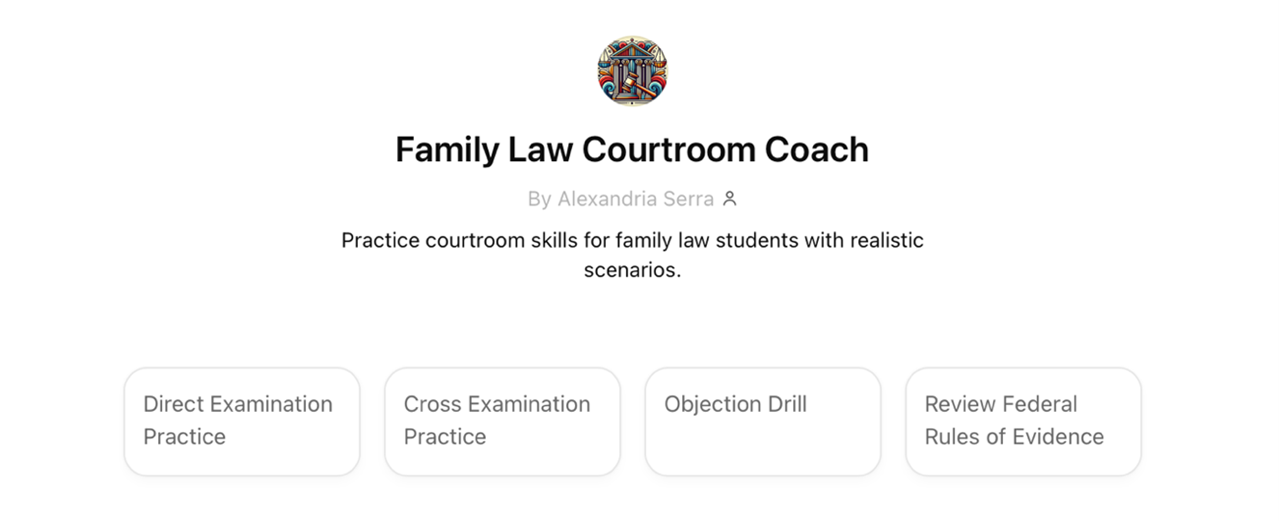
For those who prefer a more natural approach, voice features enable spoken conversations through phones or tablets. Every interaction generates a transcript, which is invaluable for reviewing feedback or continuing previous training sessions. The screenshot below shows a view from the ChatGPT iPhone app with an option for audio transcription as well as voice mode.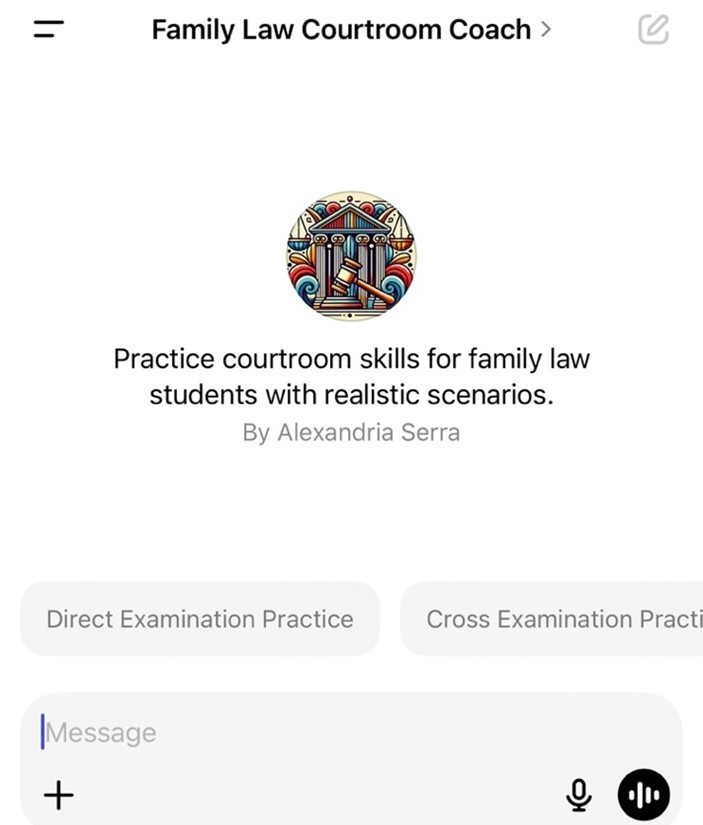
ChatGPT’s voice capabilities increasingly support natural conversations, enabling dynamic interactions. As this technology advances, creators will see even more sophisticated real-time dialogues, expanding the tool’s utility in trial advocacy training.23
B. What Can Trial Coaches Do?
Custom GPTs revolutionize the trial advocacy classroom. Imagine a teaching assistant available 24/7, switching effortlessly between roles of a hostile witness to seasoned judge, and providing feedback aligned with the professor’s teaching style. Such capabilities already exist. The following ten applications of Custom GPTs show how AI enhances traditional teaching methods without replacing them.24
1. Interactive Courtroom Simulation: AI trainers inhabit multiple personas, including judges evaluating objections, opposing counsel responding to arguments, and witnesses answering questions.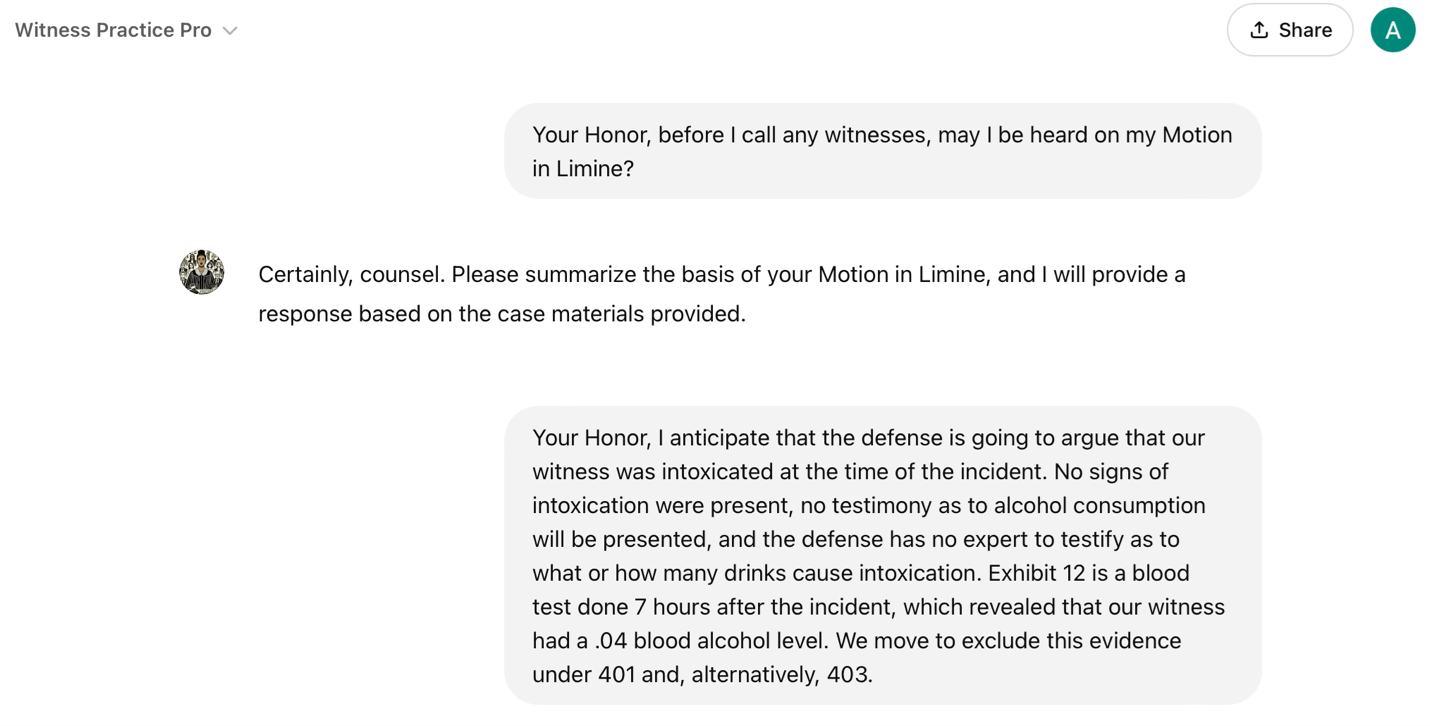
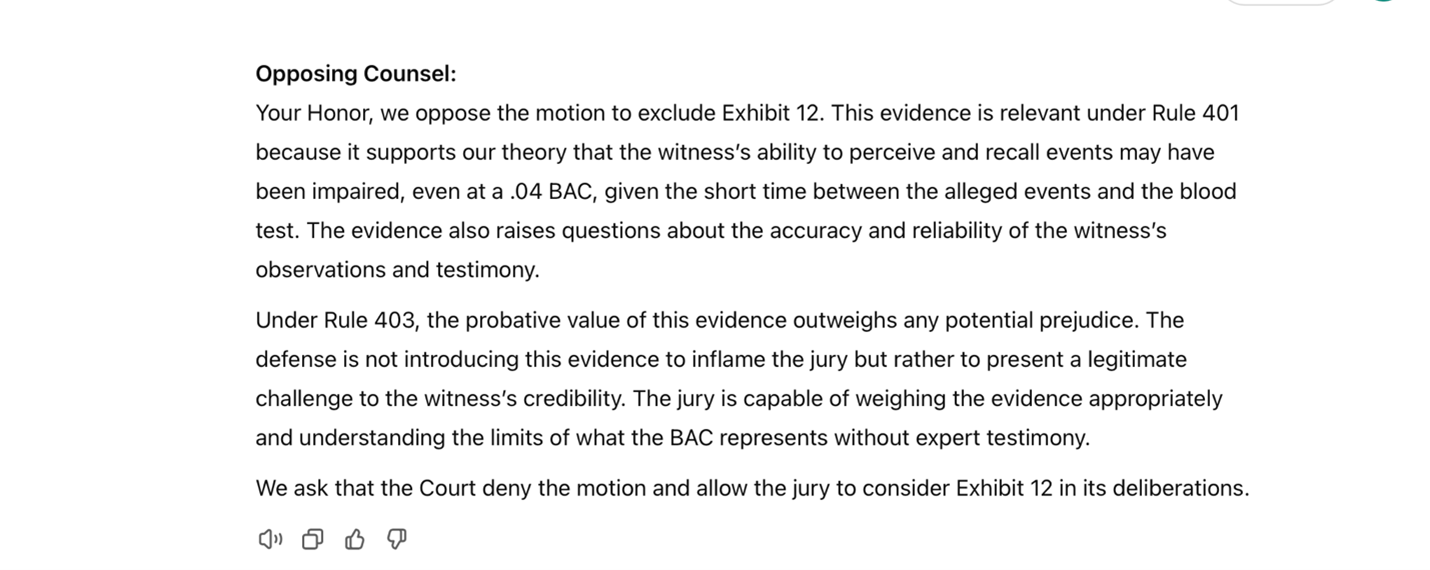
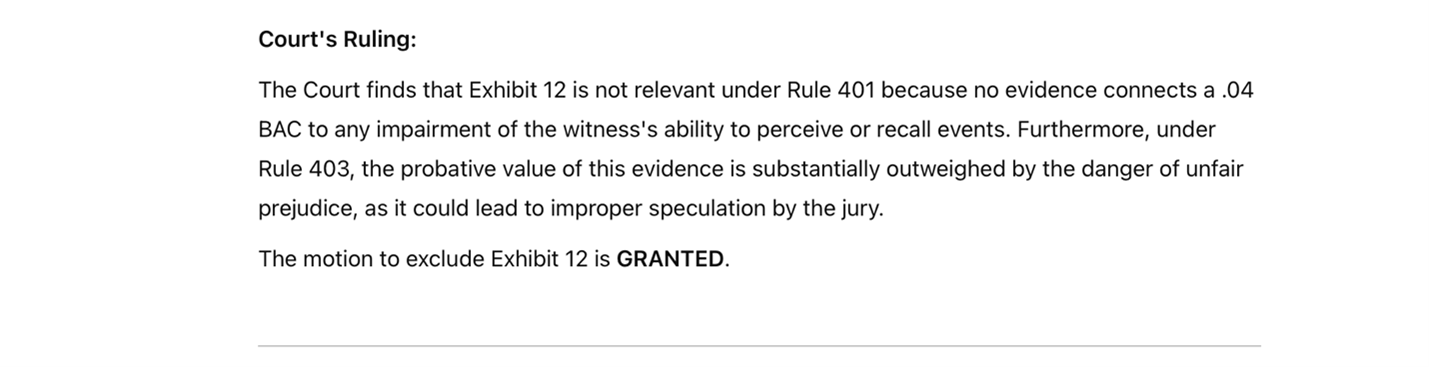
2. Mastering Objection Mechanics: AI provides rapid-fire practice with customizable scenarios. Students practice spotting issues, stating grounds, and responding under pressure.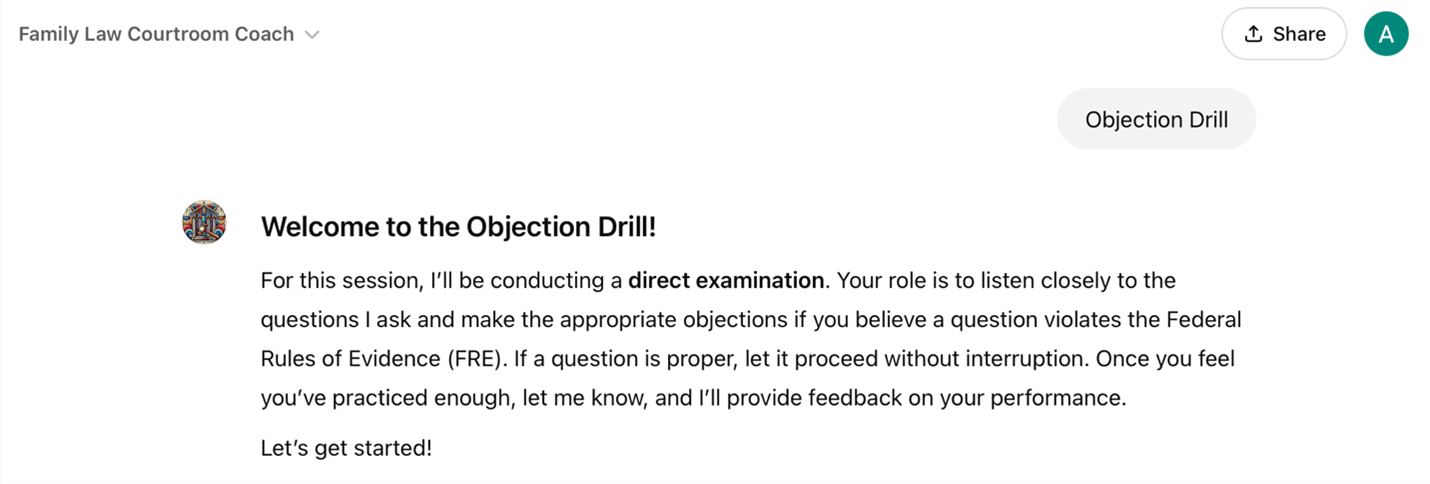
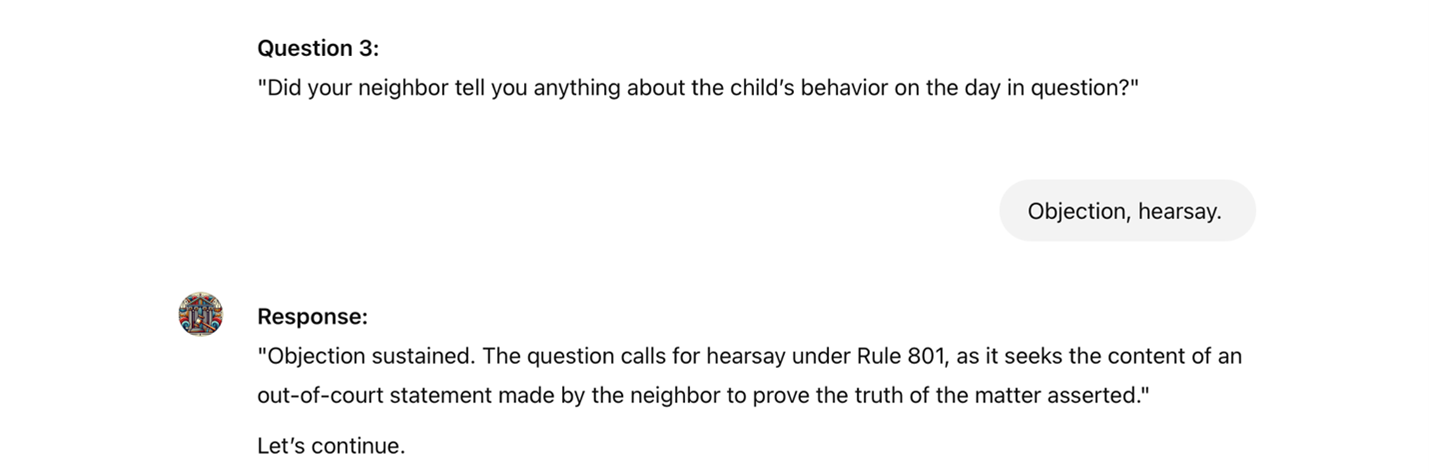
3. Witness Examination Practice: AI creates witnesses with distinct personalities, pushing students to adjust questioning strategies, perfect impeachment techniques, and develop skills in handling hostile, evasive, or emotional witnesses.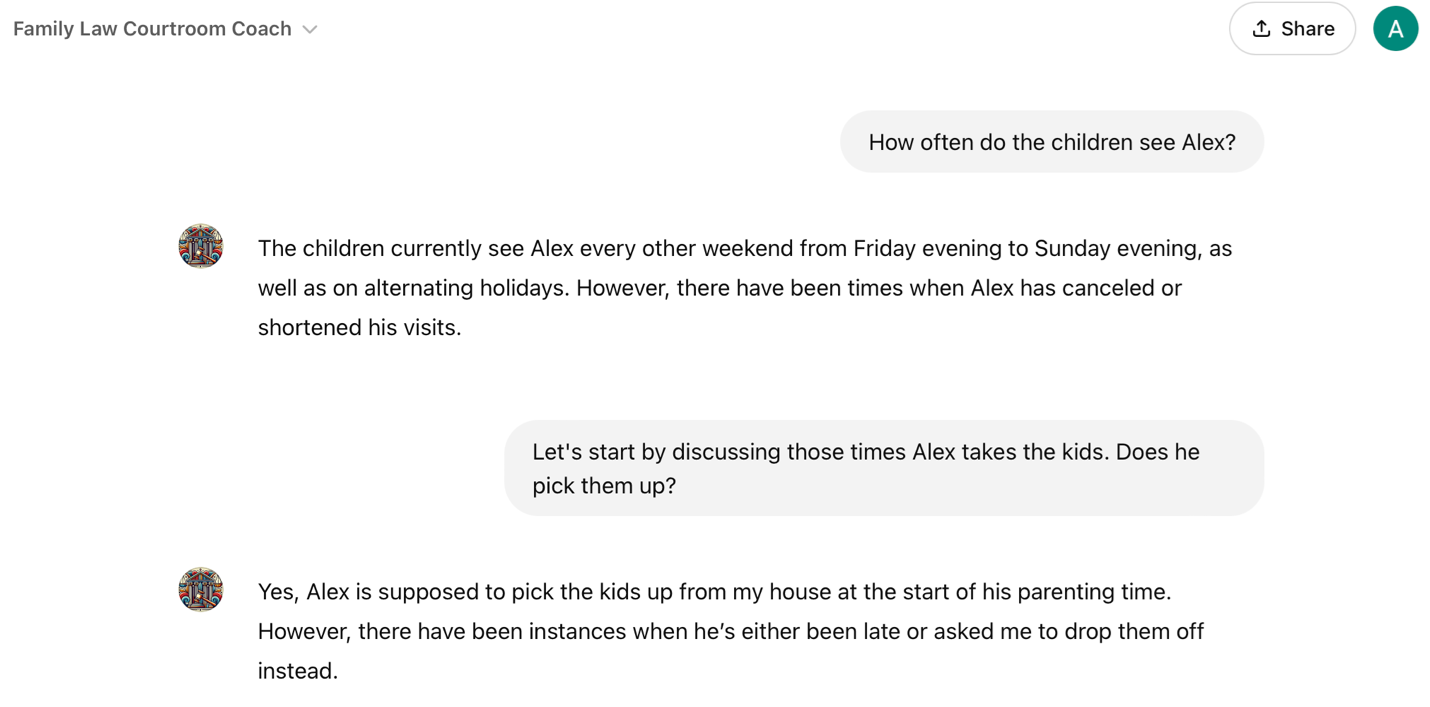
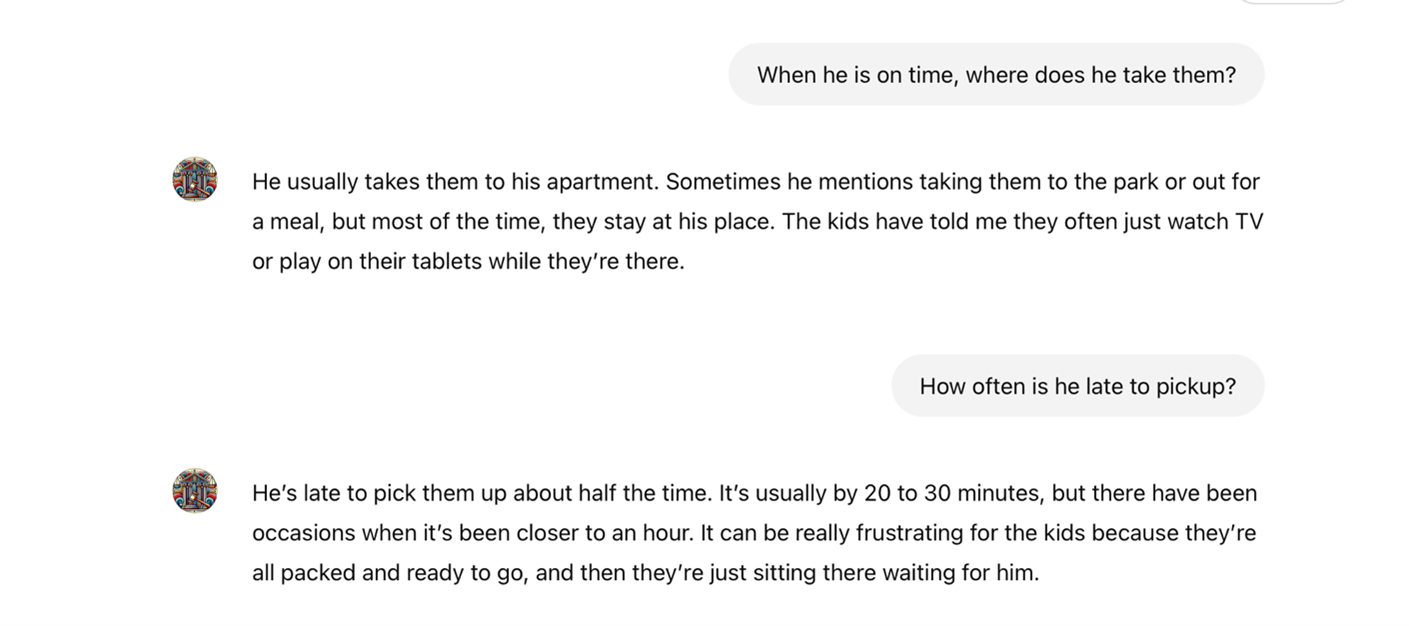

4. Evidentiary Practice: AI provides repetitive practice in laying the foundations for different types of evidence with immediate feedback on missing elements. AI can generate synthetic evidence using DALL-E3 and Sora, so students can practice authenticating, challenging, and using AI-generated exhibits during witness examination.
DALL-E3, ChatGPT’s image generation feature, is available to all ChatGPT users.25 DALL-E3 generated this image from a simple prompt.

OpenAI’s text-to-video synthesis model, Sora, represents another significant advancement in GenAI technology. The model demonstrates remarkable capabilities in translating basic textural descriptions into video sequences,26 as evidenced by the following screenshots of a video developed from a simple summary of a fictitious case:
I am a trial advocacy teacher. I would like you to create a quick, 5-10 second video of a man robbing a convenience store. He brandished a large knife and ran off with a plastic bag of money. His face was covered.
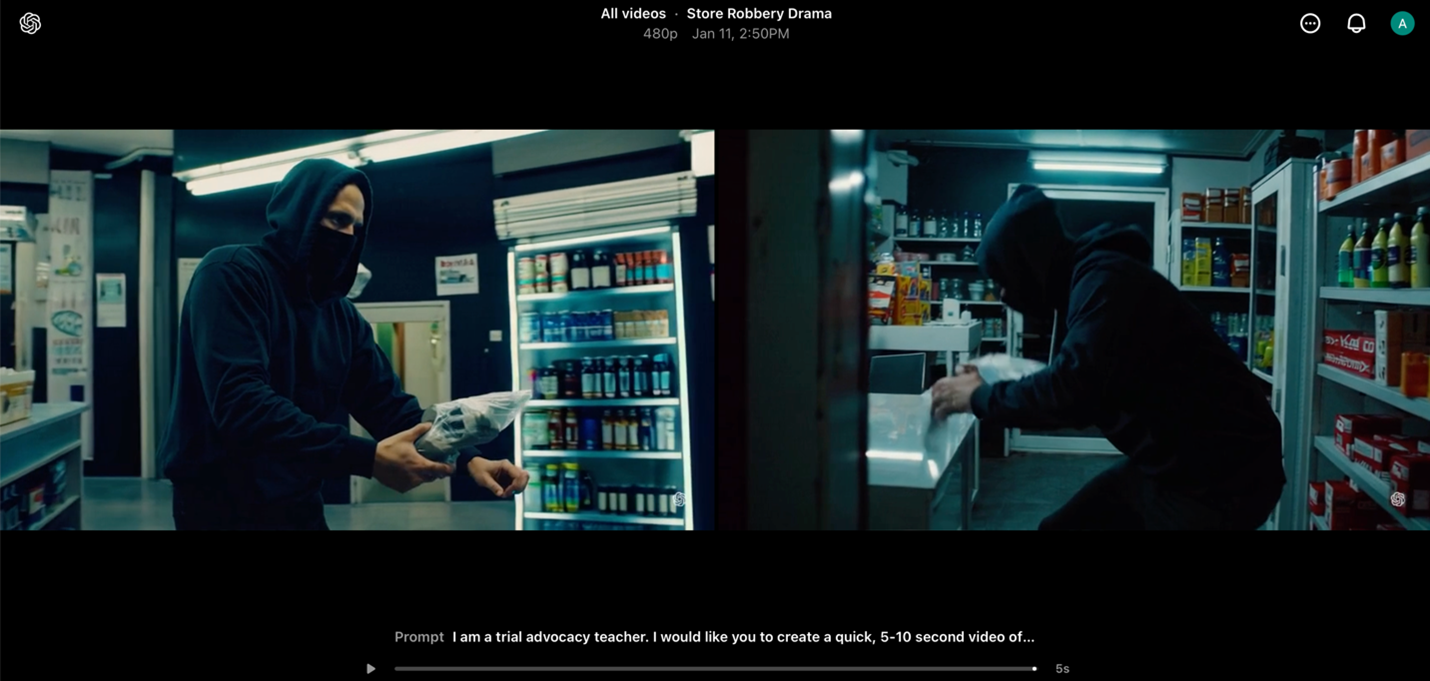

Using a simple textual prompt, Sora generated this video sequence of an accident:
I am a plaintiff’s attorney in an accident case. My client was traveling east on an interstate. Due to potentially icy conditions, he was going 50mph. A dump truck was traveling on that same road in the same direction and traveling almost 40mph. The dump truck driver was distracted, did not break and slammed into the Camry, crushing part of it. Can you create an accident video of that scene?

Despite current technical limitations, these generative AI models signal a clear trajectory toward photorealistic still and motion imagery outputs. The rapid advancement of these technologies suggests imminent improvements in visual fidelity and temporal coherence.
5. Real-Time Personalized Feedback: AI provides feedback aligned with instructor rubrics, enabling students to explore specific issues in depth or immediately apply corrections through iterative practice.
6. Voice and Delivery Skills: AI quantitatively assesses vocal delivery components, pace, volume, clarity, and filler words, and generates customized exercises for targeted improvement.
7. Voir Dire Simulation: AI generates varied juror personas, allowing students to refine questioning techniques across a spectrum of potential responses and behavioral patterns.
8. Active Listening Drills: AI simulates witness testimony to develop responsive questioning skills, addressing a fundamental challenge in trial advocacy: the tendency to prioritize preparing questions over exploiting witness responses.
9. Targeted Skill Development: AI identifies specific weaknesses in trial techniques and generates customized scenarios that progressively challenge these skills. The system calibrates exercise difficulty as student proficiency improves.
10. Interactive Motion Practice: AI simulates judicial officers and opposing counsel during pretrial proceedings, allowing students to develop oral advocacy skills through motions to suppress, motions in limine, and offers of proof while responding to dynamic questioning and procedural challenges.
Beyond these ten use cases, AI holds immense potential to empower learners with disabilities. For instance, integrating large language models with text-to-speech or speech-to-text integration (e.g., ChatGPT with voice) provides significant support for the visually or hearing impaired. These examples showcase AI’s emerging role in creating rich, responsive learning environments for legal education, constrained only by an educator’s imagination.27
C. Why Do AI-Driven Approaches Fit the Students We Teach?
Generation Z learners, immersed in digital environments from a young age, favor educational approaches integrating technology and promoting self-directed learning.28 This cohort often prefer e-learning platforms and interactive technologies over traditional methods, valuing tools for autonomy and personalized engagement. Tech-driven instruction aligns with their expectations for immediate feedback, collaborative opportunities, and access to dynamic resources. Incorporating AI tools into education caters to these preferences by providing adaptive, interactive, and flexible learning environments that resonate with their digital fluency and engagement styles.29 This preference for technology-driven learning is expected to be even more pronounced in the upcoming Generation Alpha.
AI-driven approaches in education align with the learning preferences of newer generations and offer a strategic solution to the challenges posed by the impending demographic cliff. Declining birth rates, increased life expectancy, and societal shifts are reshaping global demographics, leading to a smaller talent pool and heightened competition among educational institutions. The number of high school graduates is projected to peak in 2025, followed by a steady decline of up to 20% through 2041.30 This phenomenon exacerbates existing pressures in an already competitive admissions environment for law schools. By valuing innovation, law schools can distinguish themselves and use AI as a critical tool in navigating recruitment challenges amid demographic shifts.
Integrating AI into law school curricula also provides a distinct competitive advantage by equipping students for the technology-driven future of the legal profession.31 Over 40% of all companies anticipate AI-driven workforce reductions by 2030.32 The legal profession is not insulated from these trends. Employers are increasingly seeking candidates proficient in using automation to streamline tasks such as research, drafting, and case management. As AI continues to reshape the profession, potentially taking on tasks traditionally assigned to junior associates, the number of entry-level positions will likely decline.33 By effectively training students to utilize AI in practice, these institutions bolster employability and distinguish their graduates in a competitive job market.34
D. Committed Faculty: The Cornerstone of Effective AI Integration
AI projects necessitate faculty who are not only knowledgeable about these technologies but also dedicated to their effective implementation. Faculty-level AI literacy is essential for meaningful integration into teaching and learning. Professors must comprehend AI operations and possess the skills to tailor these technologies to their courses’ specific needs, requiring a sustained commitment to improvement.35
Expert oversight is essential for navigating the complexities of AI in education. As Wharton School professor Ethan Mollick observes, subject matter experts are the only ones uniquely equipped to evaluate AI outputs, identify errors, and make necessary corrections.36 While AI can excel in executing tasks, it achieves its full potential only under the guidance of knowledgeable professionals. Professors are the subject matter experts who remain pivotal in refining AI systems and ensuring their outputs align with pedagogical objectives.
Make no mistake: the development of AI tools is an ongoing, iterative process that demands continual refinement and feedback. Trial and error, coupled with student input, are essential to improving these technologies and delivering impactful, real-world learning experiences. Faculty dedication to this iterative process ensures that AI tools remain practical and relevant. Without such commitment, these innovations risk falling short of their potential.37
III. Benefits of AI in Trial Advocacy Training
AI tutoring enhances trial advocacy education by complementing traditional teaching methods. By delivering tailored support to individual students, these tools allow classrooms to focus on richer discussions, creative problem-solving, and deeper critical analysis. The following sections explore five key benefits of incorporating AI tools in the advocacy classroom. Each benefit is illustrated in the form of a situational example.
A. Adaptive Feedback and Ongoing Improvement
Sarah, a trial advocacy student, falls behind as the semester progresses. The material, objection practices, cross-examination strategies, and crafting persuasive arguments, feels overwhelming. Despite her efforts to practice, her skills remain stagnant. Feedback from her professor is helpful but arrives after in-class exercises, making it difficult for Sarah to address issues. As her frustration grows, she starts skipping class, convinced she will never catch up.
In traditional classrooms, opportunities for personalized, real-time feedback are limited by the natural constraints on a professor’s time. Even during office hours, professors can only work with a fraction of students in-depth, leaving others to struggle with unresolved questions. Sarah needs more opportunities to practice and receive guidance outside of class, but where can she turn?
AI tutoring tools provide a solution by offering 24/7 access to feedback designed to reflect the professor’s teaching methods and expectations. Sarah can practice at her own pace and as often as necessary, gaining actionable insights tailored to her progress. For example, if Sarah has difficulty formulating concise objections, AI identifies this challenge and gives guidance aligned with the strategies emphasized by her professor in class. As Sarah improves, AI adjusts, presenting more nuanced critiques to challenge her growing skills.
This flexibility also means Sarah does not need to rely solely on scheduled class time or wait for office hours to get help. She can focus on specific problem areas and work through them repeatedly.38 With this adaptive support, Sarah catches up and builds the confidence to reengage in class.
AI tools also offer the unique advantage of aligning with the curriculum. They can be customized to the course, the professor, or the university that designs them.39 By reflecting the professor’s instruction and incorporating the same standards used in class, AI ensures students are practicing the right skills correctly. For Sarah, this means every session with AI reinforces what she has already learned, helping her stay on track.
Like other intelligent technologies, AI tutors can significantly improve learning outcomes like student engagement, knowledge retention, and academic performance, thus providing the scaffolding for effective learning.40 The adaptive nature of the AI tool presents an opportunity for significant growth outside the classroom, regardless of skill level. Studies support a 15-20% performance improvement over in-class instruction alone when students use an AI-based supplement. Although empirical studies in trial advocacy have not been conducted at the time of this writing, existing research shows promising potential.41
B. Privacy and Safe Experimentation
Antonio is a law student working hard to improve his advocacy skills. Despite his dedication, he hesitates to experiment with his peers. The pressure of performing in class makes him self-conscious, mainly when delivering his opening statement. He struggles to maintain eye contact with his classmates for extended periods, and this fear of judgment holds him back from trying new approaches and fully immersing himself in the storytelling.
A reluctance to experiment is a common challenge for many law students. The anxiety often stems not from professors’ feedback but from the psychological pressure of performing publicly. The Socratic method, a hallmark of doctrinal classes, can instill a fear of appearing unprepared or unintelligent in front of peers.42 While most trial advocacy classrooms are not Socratic, they require performance evaluations, which are essential for training future advocates and helping students grow comfortable presenting to others. Even so, the fear of making mistakes in front of classmates, coupled with peer pressure and the high expectations of law school, can stifle meaningful engagement, especially early on in the process.43
AI tools provide a safe, private space for students to practice without the fear of judgment. For Antonio, this means rehearsing his opening statement out loud in front of a screen, where he can receive detailed feedback on his tone, cadence, pacing, and overall delivery. This private environment encourages experimentation, enabling him to test new strategies and refine his technique without the pressure of an audience. With the ability to work at his own pace, Antonio gains the confidence to push beyond his comfort zone and fully engage in his advocacy training.
These AI tools offer students the flexibility to revisit material as needed, allowing students to address weaknesses and refine their skills. Users’ prompts and data are stored exclusively on that user’s account and inaccessible on external servers. Depending on the institution’s configurations, professors can only view a student’s transcript if the student chooses to share it. This private design alleviates a common challenge in law school, the anxiety of exposing one’s learning process to peers. By minimizing public scrutiny, students can engage deeply with complex material and experiment with different techniques in ways traditional classrooms may not fully support.44
Some educators argue that the best way to develop trial advocacy skills is to confront the challenge of public performance head-on. Exposure to public performance is, without question, essential for developing the resilience, adaptability, and confidence every trial lawyer needs. However, students enter the classroom with varying comfort levels in this area. AI tools complement rather than replace live practice by creating a space for students to build foundational skills and confidence in private.
The private environment supported by AI tools encourages exploratory learning, empowering students like Antonio to build confidence and achieve intellectual growth. These tools allow students to experiment, make mistakes, revise, and refine their skills at their own pace, fostering greater engagement and self-assurance. For those who struggle with performance anxiety, AI tools act as a stepping stone, helping them prepare to fully participate in live, high-pressure settings and succeed in both the classroom and courtroom.
C. Enhancing Trial Strategy with Simulated Feedback
Imani is preparing a direct examination but struggles to anticipate the challenges she might face during the trial. As she practices questioning her witness, she often finds herself stuck when the witness’s answers substantially deviate from what she had planned. What if the judge interrupts her? What if opposing counsel objects? Will she respond effectively, or will she freeze? Imani knows these moments are inevitable, and the uncertainty leaves her feeling underprepared.
AI tools help Imani experience the dynamic and unpredictable nature of a courtroom by simulating key roles and scenarios she might encounter. Instead of rehearsing her direct examination in isolation, the AI generates a realistic trial environment where she must navigate multiple challenges simultaneously, responding to objections from opposing counsel, adjusting to judicial interruptions, and reacting to unexpected witness answers. These immersive practice tests focus on her questioning skills and her ability to adapt to the unpredictability of actual trials.
For example, as Imani questions her witness, AI might simulate an objection from opposing counsel, requiring her to respond immediately. If the judge interrupts to seek clarification, Imani must address the judge’s concerns without losing focus on the witness or her overarching strategy. AI provides targeted feedback on how she handles these challenges, helping her remain composed, pivot quickly, and manage the trial’s fast-paced dynamics.
AI also allows Imani to rehearse responses to specific objections under the rules of evidence, federal or state rules. These scenarios strengthen her ability to anticipate and overcome objections, effectively objection-proofing
her examination while building confidence.
Comprehensive practice strengthens Imani’s broader trial strategy. By practicing tactics for recovering from setbacks or knowing when to move on from a line of questioning, Imani develops the adaptability and strategic thinking essential for trial success.
D. Increased Engagement and Active Learning Through Gamification
Kian is practicing his cross-examination skills but finds the process monotonous and unmotivating. He understands the importance of consistent practice, but repetition makes it harder to stay focused and invested in improving. AI tools address this challenge by incorporating gamification, which makes skill development more interactive and enjoyable. Research on gamification highlights the value of rewards and measurable progress in keeping learners motivated while mitigating disengagement in digital learning environments.45 Michael Easter’s work in Scarcity Brain explains that humans are driven by the satisfaction of incremental accomplishments, particularly when tasks are framed as urgent or challenging.46 For students like Kian, gamification provides these moments of achievement, turning practice into a dynamic learning experience.
Gamification taps into the brain’s reward system by offering real-time feedback on progress.47 As Kian practices, AI tracks several performance metrics, such as his ability to control thewitness and the clarity and focus of his questioning. Through points, badges, and levels, AI provides immediate recognition for improvement, reinforcing positive behaviors and encouraging sustained effort. When Kian masters an exercise, he receives feedback on what he did well, fostering a cycle of positive reinforcement that motivates continued practice.
Behavioral research supports that the sense of accomplishment from seeing measurable progress helps maintain long-term engagement and task attractiveness.48 As Kian works through more complex cross-examination exercises, AI gradually introduces more difficult tasks that stretch his abilities, creating a sense of scarcity where success feels more rewarding. This approach combines achievable goals with escalating difficulty, a recipe for maintaining student interest.
By integrating elements of play and competition, gamification elevates routine practice into a stimulating and rewarding endeavor. Students like Kian remain engaged as they tackle progressively more complex challenges, observing measurable growth in their skills. This methodology balances structure and innovation while promoting sustained intellectual development.
E. Preparing for Practice
Taegan is about to graduate and begin her career at a respected litigation firm. Although she excelled in trial advocacy classes and mock trial, stepping into an actual courtroom feels daunting. The stakes are higher, demanding mastery of trial skills and an ability to navigate emerging legal technologies.
The legal profession’s increasing reliance on AI underscores its importance in preparing students for practice. Nearly 70% of law firms report operational improvements from AI, with 90% planning further investment.49 Engaging with AI during law school equips students like Taegan with the technical and critical skills necessary to meet these evolving demands.
Experience with AI sharpens the ability to craft precise prompts, a skill directly applicable to legal research, drafting, and case analysis. It also builds critical awareness of AI’s limitations, such as errors, unsupported claims, sycophancy and hallucinations, reinforcing the need for rigorous verification and cite-checking.
Besides improving efficiency, familiarity with AI enables students to address complex issues in litigation, including analyzing digital evidence, navigating novel evidentiary challenges, and assessing the authenticity of AI-generated content like deepfakes. As these issues become more prevalent, students with hands-on experience gain a distinct advantage in practice.
By incorporating AI tools into her training, Taegan begins her career equipped to adapt to technological advancements. Her ability to critically evaluate and strategically apply AI enhances her readiness so she can excel in a profession increasingly shaped by technology.
IV. Trial Advocacy Use Cases: What We’ve Done So Far
AI in advocacy training is moving from concept to classroom.50 Educators have created tools that replicate trial roles and generate feedback tailored to student performance. This section surveys those applications and the insights drawn from initial rounds of experimentation, paving the way for the building process outlined in Section V.
A. Current Custom GPT Prototypes & Applications
Faculty at the University of Missouri Kansas City School of Law (UMKC Law
) have taken a hands-on approach to integrating AI into clinical training by building custom litigation tools designed to supplement class instruction. The most advanced of these prototypes, MootMentorAI, was designed around the first-year moot court problem.51 Lessons learned from its development led to additional AI-driven trainers for (1) mock trial practice, (2) evidence, (3) the family law clinic, (4) negotiation and dispute resolution, and (5) direct and cross-examination exercises. The purpose of these tools was not commercial gain but accessibility. UMKC Law set out to prove that lawyers without coding backgrounds can build effective AI resources for legal education. MootMentorAI originated as a conceptual exercise in June 2024, and UMKC faculty developed it without coding experience and only a basic understanding of AI’s capabilities.52 The following screenshots include examples of some of the tools UMKC professors developed.53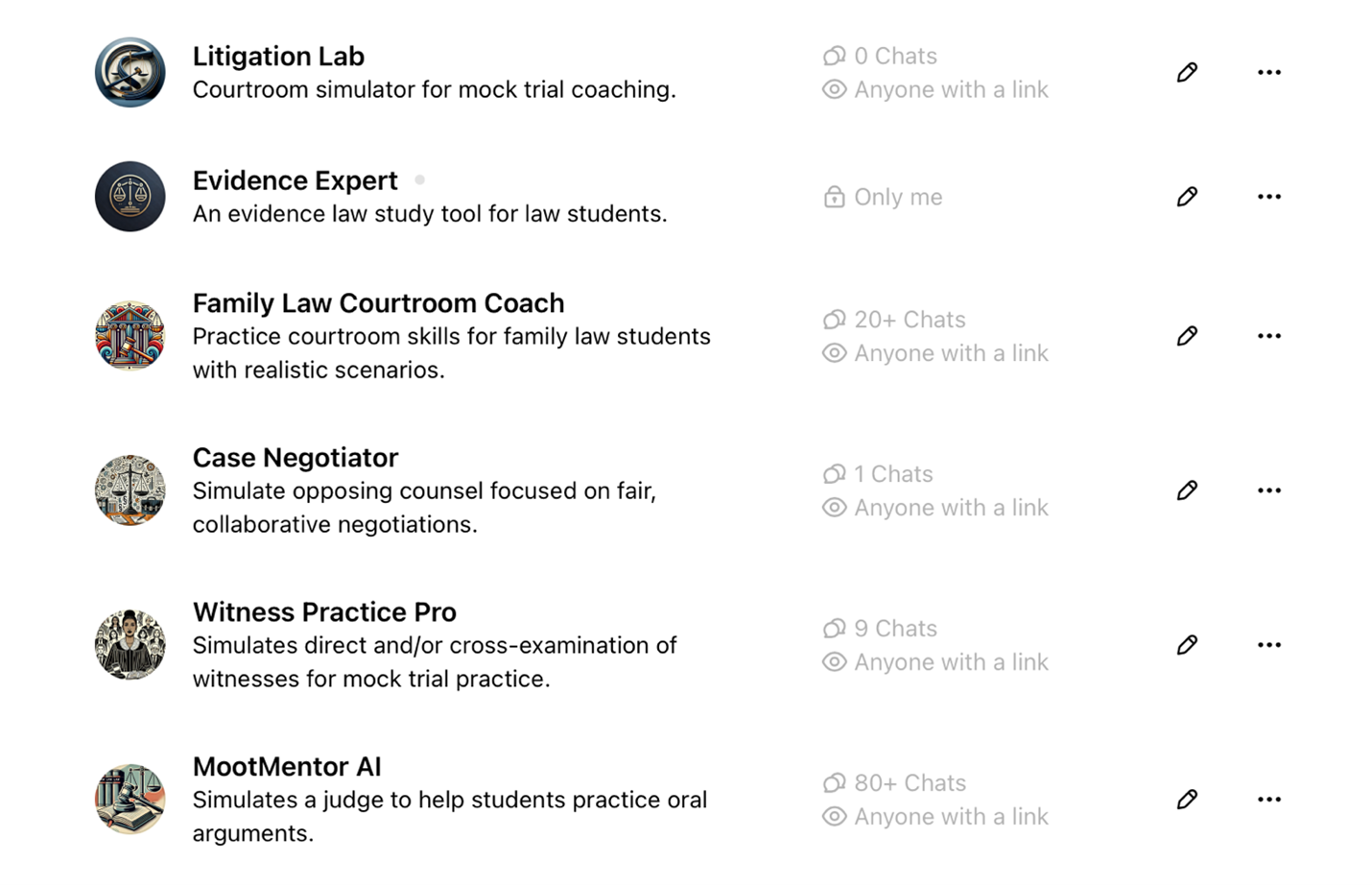
Through internal lunch-and-learn presentations, collaboration with research assistants, and rounds of iterative refinement, UMKC Law piloted Family Law Courtroom Coach and MootMentorAI with small groups of litigators. These early trials tested whether simple, custom-built tools could hold up in advocacy practice.
Both students and faculty shared extensive feedback. While primarily quantitative, requiring further empirical study, the feedback generated renewed enthusiasm for the potential of this technology. Notable comments include:
We love it.
– Clinical Professor
I had no idea this was even possible.
– Professor
AI is making complex legal ideas more tangible and easier to retain.
– Student
This is a great way to supplement the teaching on oral argument because it gives the students a chance to do something they can’t do in class.
– Student
This [tool] is a way for students to lessen their anxiety around their argument… and give the students better insight into what a judge or witness might prompt you with in real time.
– Student
Overall, I felt that my arguments became clearer and stronger the more that I argued . . . I think that a student could also get something out of working with it just once, but it would definitely not serve the student nearly as much as it would if the student engaged with it at least 5 times.
– Research Assistant / Teaching Assistant
As enthusiasm grows, several professors at UMKC are harnessing AI to build their own classroom tools. Whether these tools are fully realized, used by students, or enhance instructors’ AI literacy, their development represents a win for the profession.
B. Transcripts
Similar to the role of a court reporter in the trial, AI offers real-time transcriptions of the dialogue between the user and various AI personas.54 The user can share these transcripts with professors as homework or as a tool to assess student comprehension. Unlike static outlines, AI-generated transcripts introduce an element of dynamism. No two answers to a question are likely to be identical. Mimicking in-person scenarios, AI-generated witness responses vary in length, include unexpected details, or be entirely unresponsive to a vague question. The unpredictability adds a layer of realism to the simulations. Reviewing transcripts allows both the instructor and the student to monitor progress and identify areas of improvement.
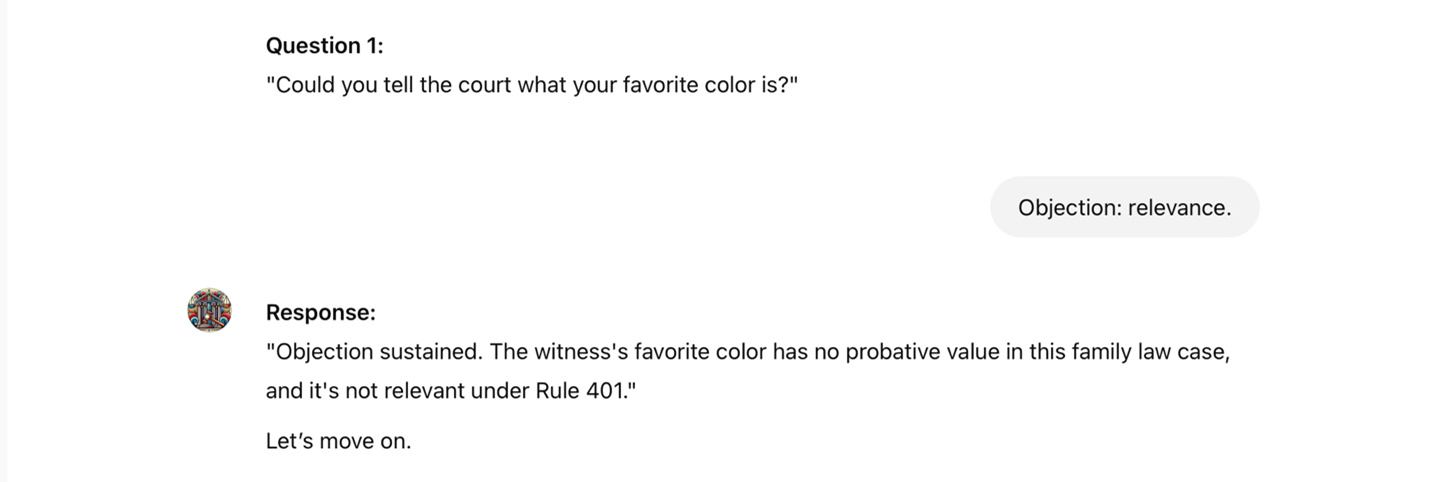
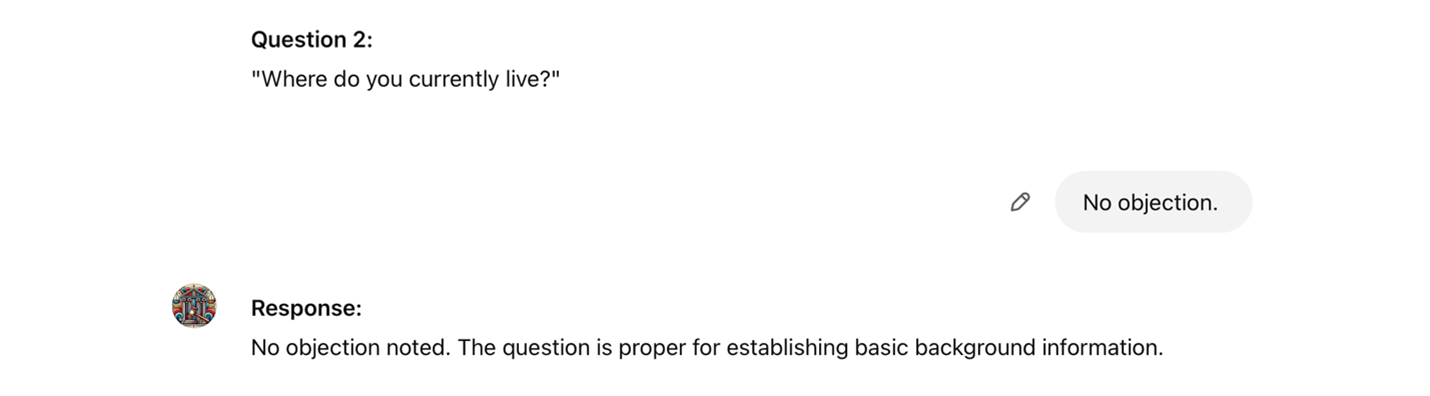
Below is an excerpt of a transcript for the Family Law Courtroom Coach tool. After the user selects a feature, in this case, direct examination, the Coach presents a case scenario related to family law. Although this example was created by AI, professors can provide specific scenarios or topic area guidance. All Custom GPTs may be edited at any time to add, modify, or remove content.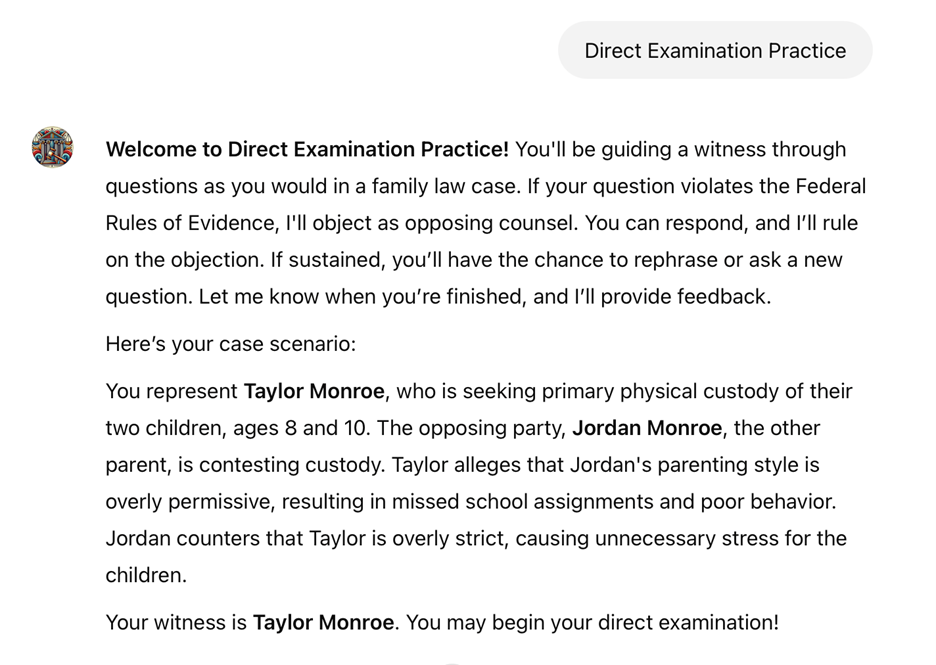

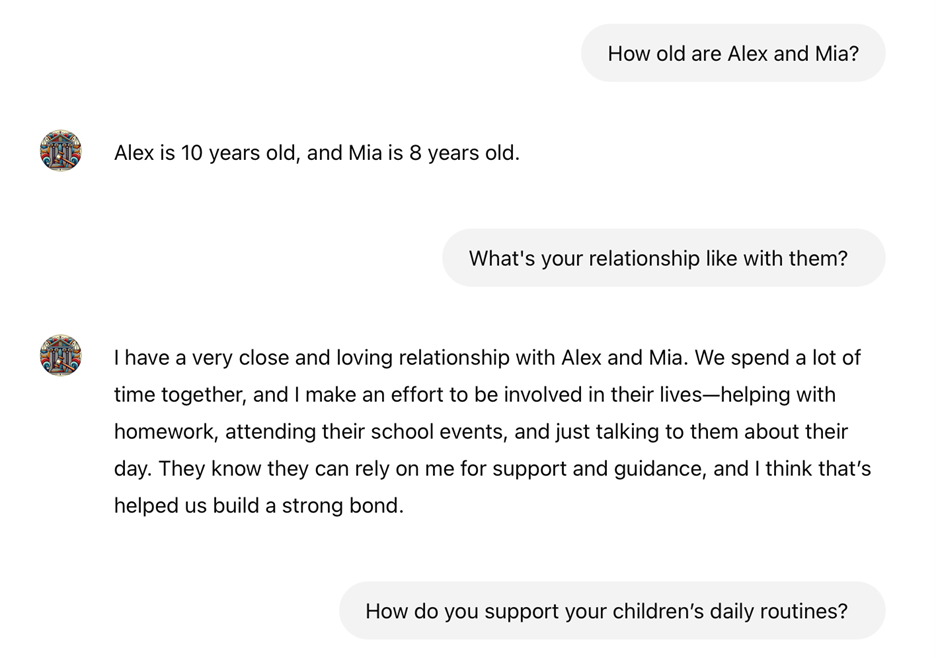
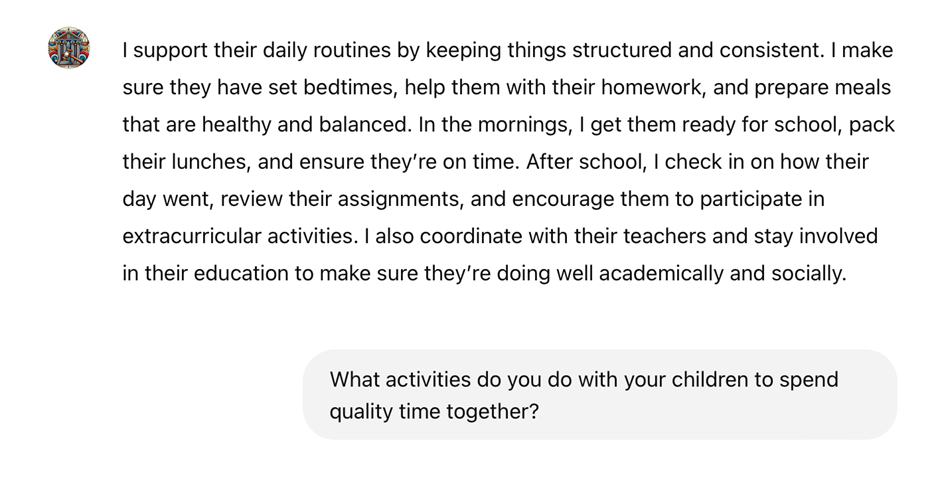
The adaptive setting for this interaction is Beginner. The conversation continues until the user asks an improper question. Opposing counsel then objects, prompting the user to respond. Based on the user’s response, the judge rules on the objection. In the Beginner phase, the tool is programmed to object on a single ground, even when the question may be objectionable on other grounds, such as leading.
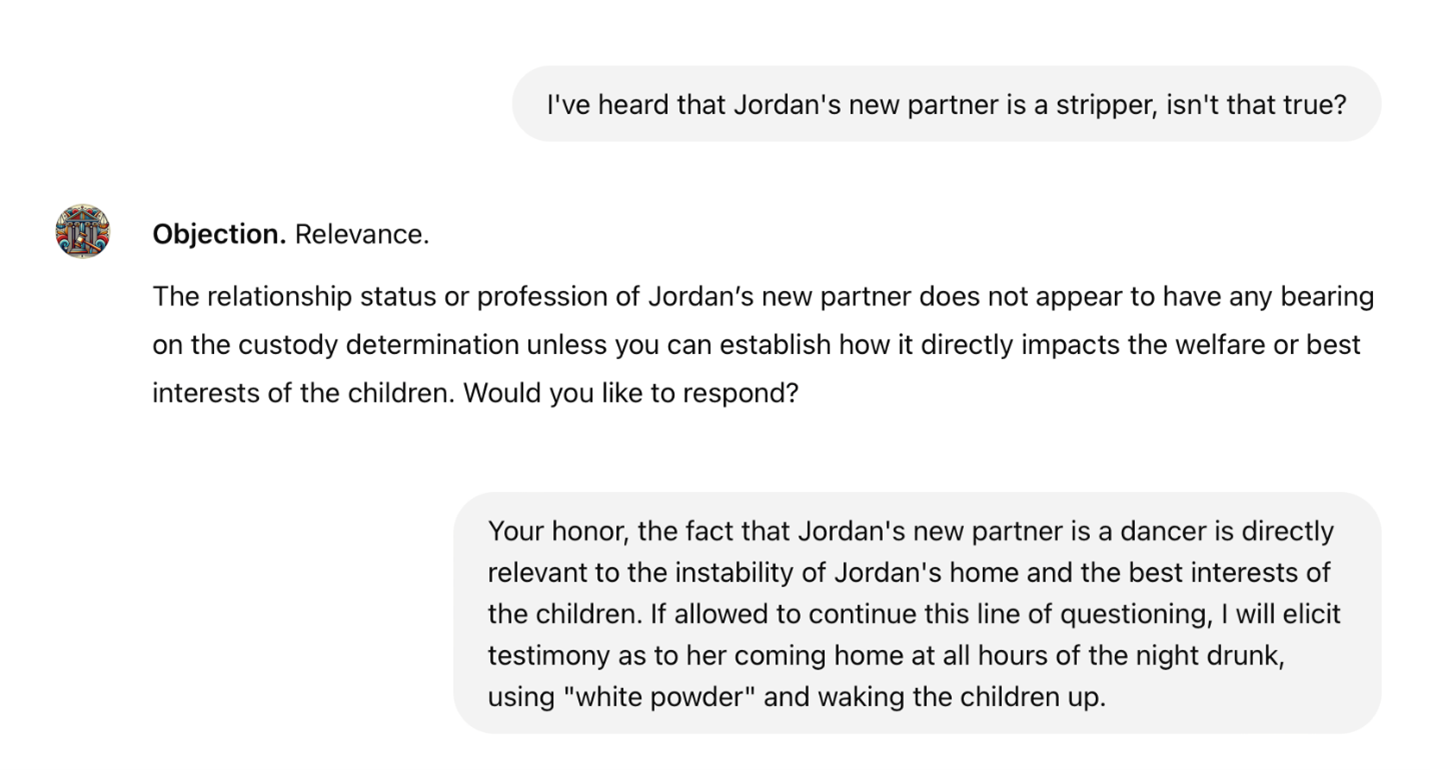

The student may proceed until the questioning is complete. After the session, the user has the option to receive feedback. An excerpt of this feedback appears in the example below.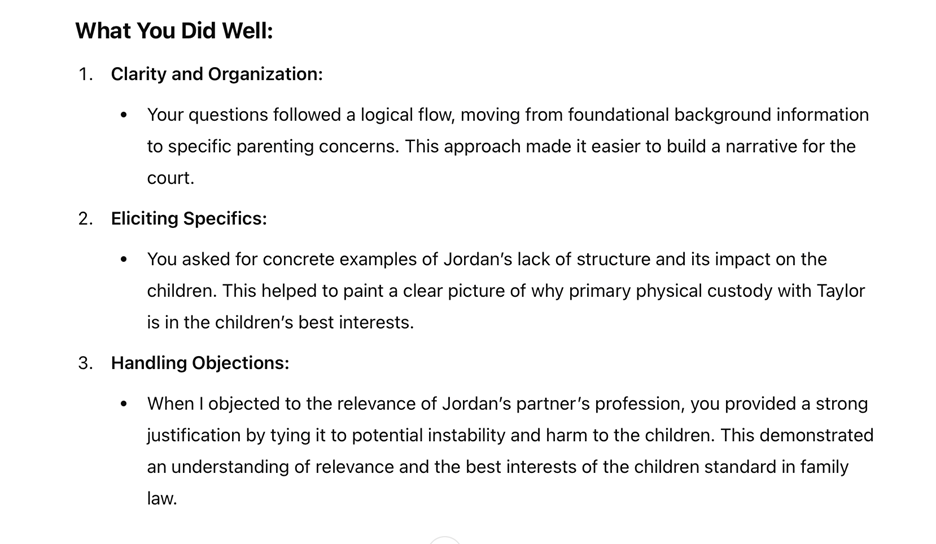
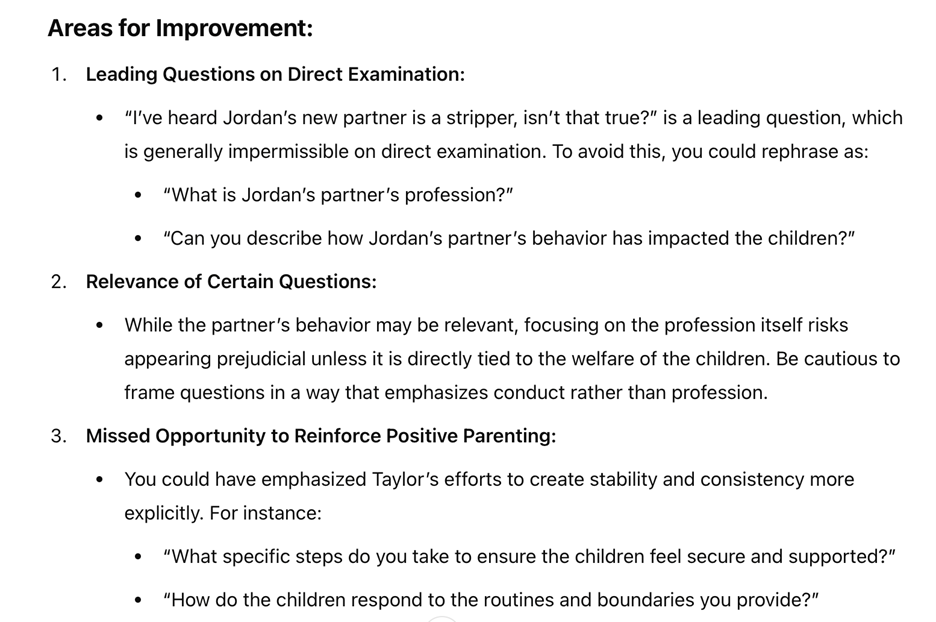
The student can ask the AI Coach specific questions about the feedback, engaging in a dialogue to clarify and deepen their understanding. Notably, while the tool did not object to the user’s leading question during the session, it identified the error in its feedback. Educators should remember that AI generates feedback based on the guidance provided during training, whether drawn from articles, outlines, course materials, instructor preferences, or similar sources. The feedback is not random
unless the creator has given no specific guidance.
The tool adapts accordingly as the user progresses in both content and skill. These adaptations may include more complex case scenarios, challenging witnesses, stricter judge personas, paired objections, or other advanced features to enhance the learning experience.
V. Integrating AI Tools Into a Custom Curriculum
The next step is implementation.55 This section outlines a step-by-step guide to developing a personalized tool using materials already prepared for the course. While free and paid solutions exist, they often lack the flexibility to align with individual professors’ unique pedagogy, strategies, and feedback styles. Educational goals vary, and customization emerges as indispensable.
Creating a custom AI tool may initially appear daunting, especially for those without technical expertise. However, modern AI platforms have streamlined the process, making it accessible to a broader audience. Using platforms like OpenAI’s GPT Builder, educators will master uploading and integrating course-specific training data, refining the tool through interactive dialogues, and harnessing the features that enhance its capabilities.56 Upon completing this guide, educators will possess the foundational skills and knowledge to create and deploy an AI tool (chatbot) optimized for their courses.
A. Initial Setup
Educators begin by accessing an AI platform like ChatGPT-5. This platform features a user-friendly interface, enabling the design, modification, and deployment of custom tools from inception. With a ChatGPT Plus subscription, users can build their own GPTs with ease. Simply click GPTs
on the lefthand menu, which will take you to the screen displayed below.57 From here, the designer can search for relevant GPTs, click My GPTs
to edit their own, or +Create for a blank canvas.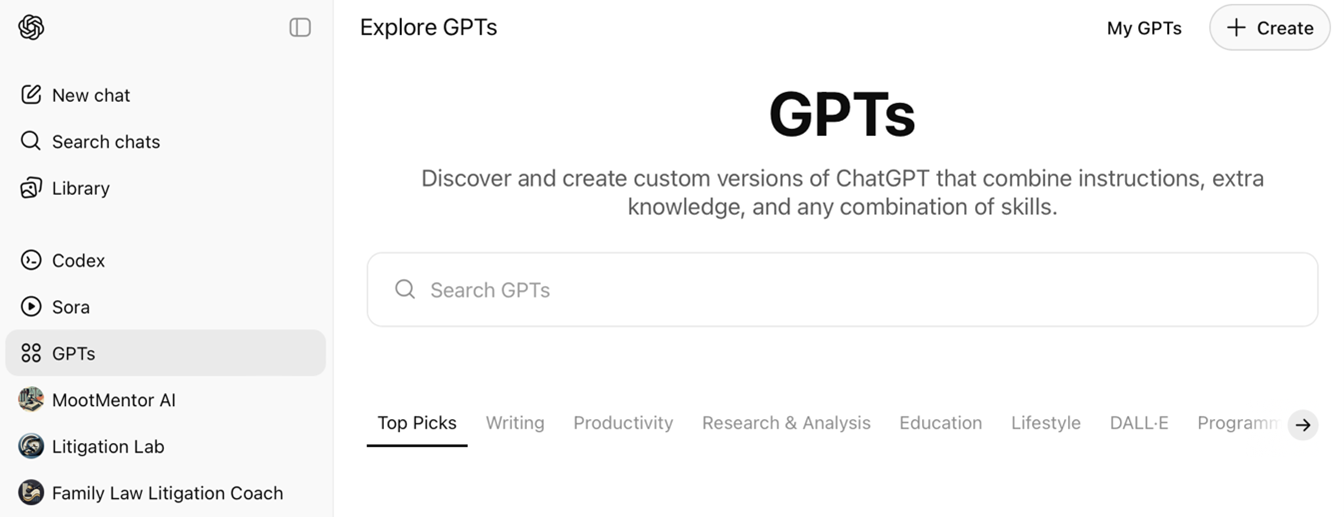
The following screenshot showcases the user’s custom tools, providing options to edit existing tools, retrain them for improved performance, or create new tools from scratch.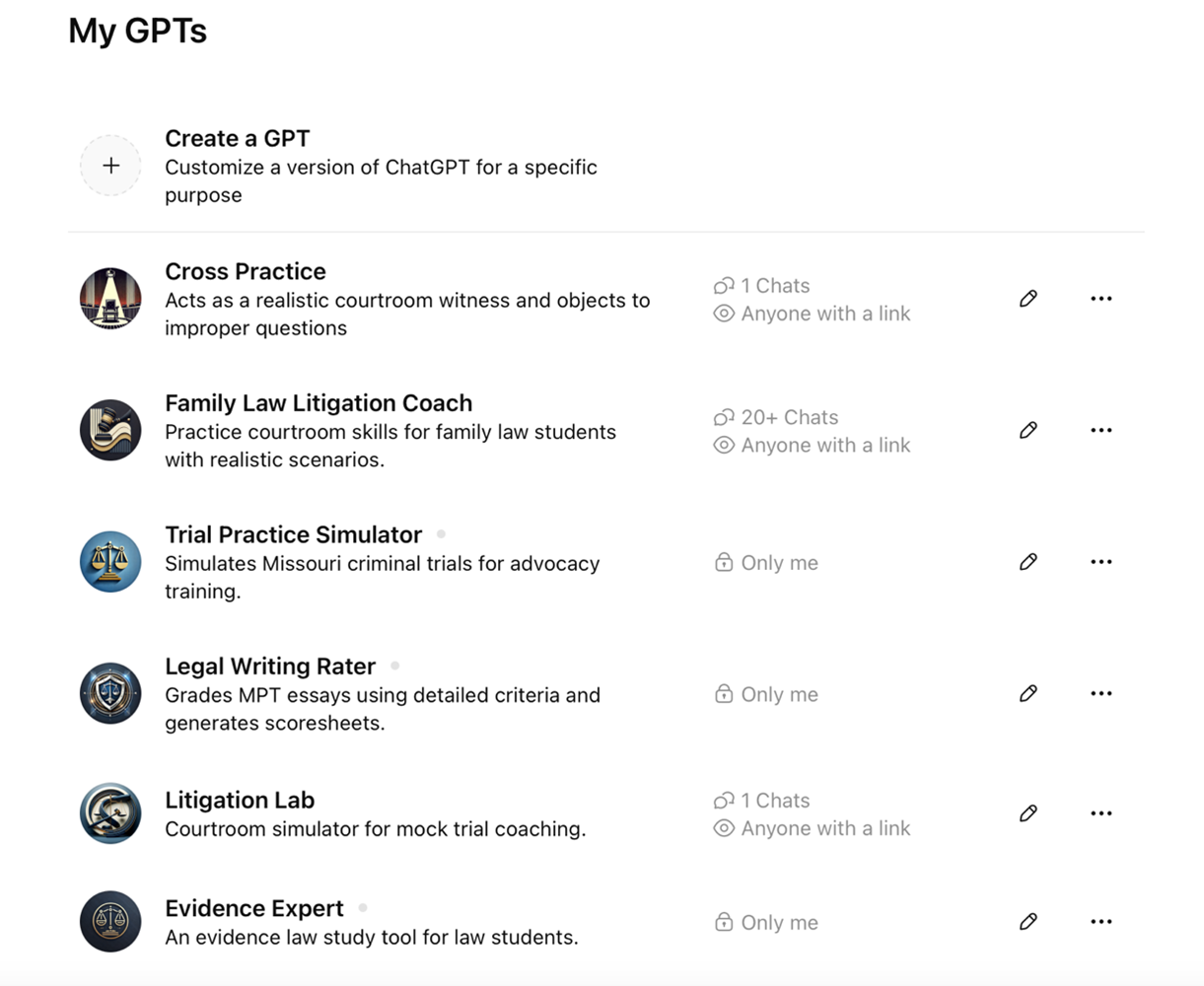
The initial interface for tool creation appears below. When armed with pre-written training data in document form, creators can integrate these materials directly into the editor. Alternatively, they can engage the GPT in iterative dialogue to develop and refine the tool. Training Data encompasses the documents, instructions, and scenarios professors incorporate to shape their custom tools.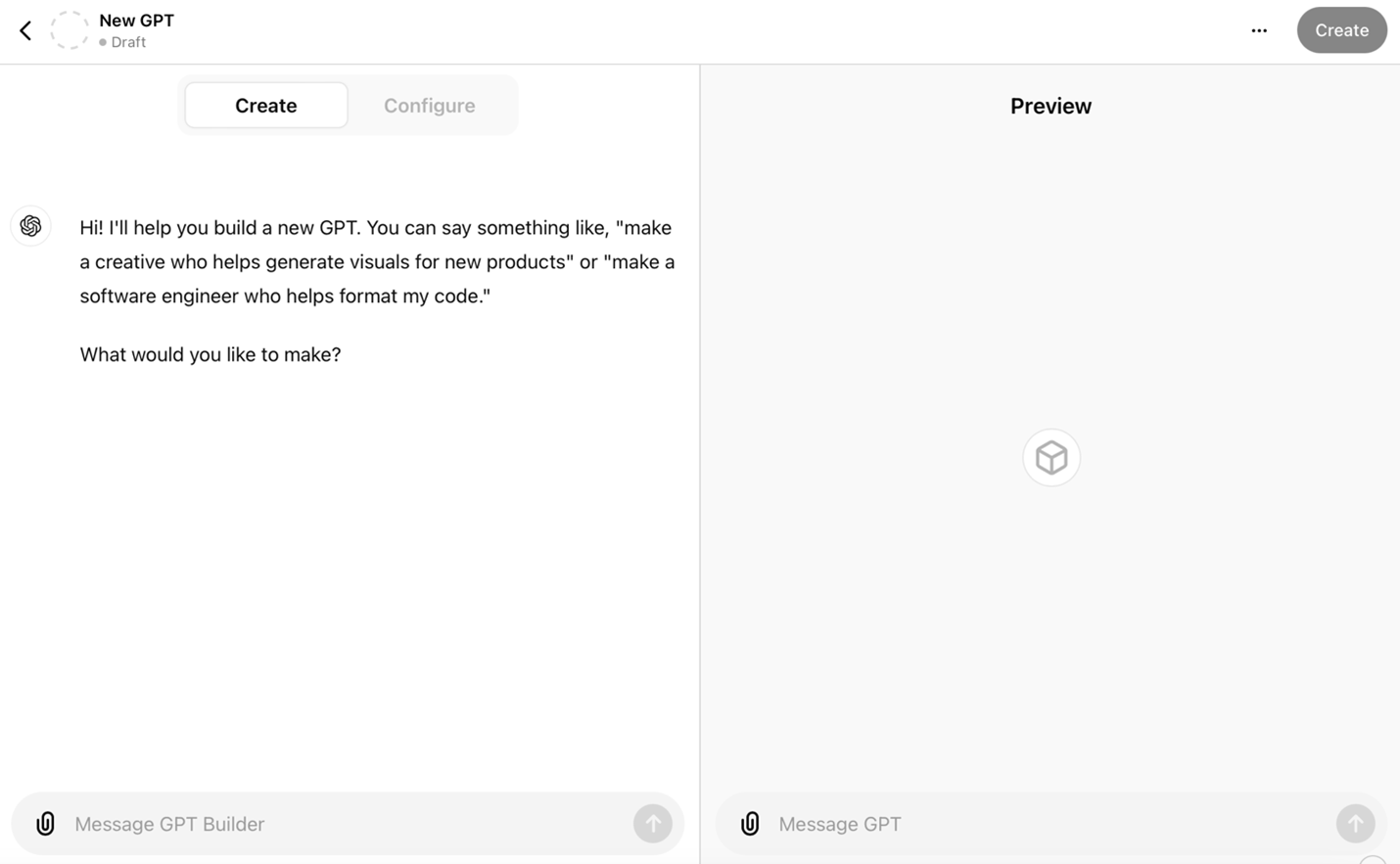
Builders shape their tools through two pathways: direct dialogue or the integration of prepared training materials. The screenshots below exemplify these developmental approaches.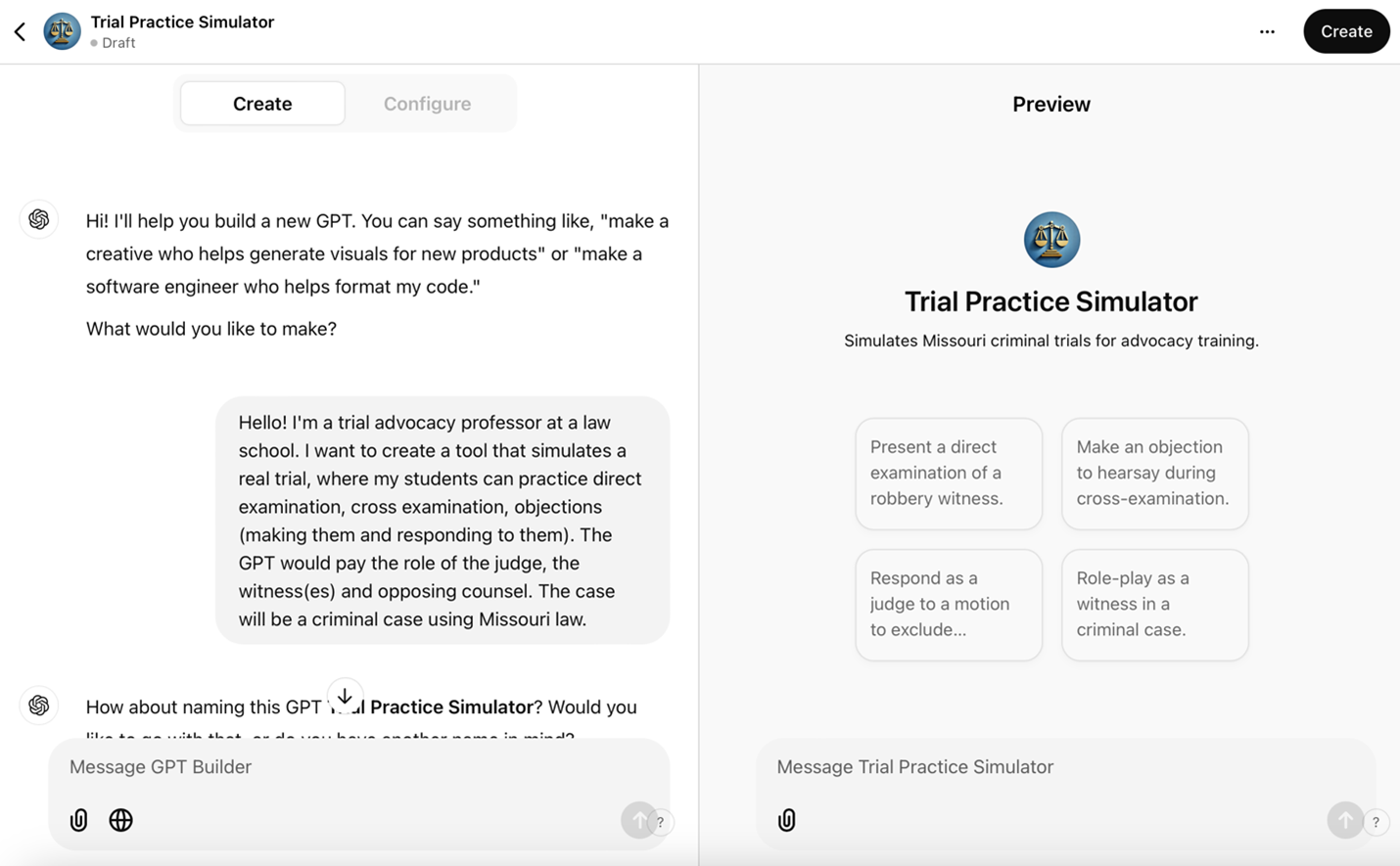
The process begins by typing a natural language prompt. The builder’s initial response yielded a preliminary name and photo for the GPT. After evaluating multiple options, Trial Practice Simulator
emerged as the definitive title. The builder’s image generation capabilities allow for direct modifications or substitution with user-selected imagery.
Following the establishment of the visual identity, the builder initiates a systematic dialogue to crystallize the project’s goals. This interactive process enables precise refinement, ensuring synchronization with pedagogical objectives. Users maintain flexibility in incorporating training data throughout development. For technical contingencies, OpenAI’s comprehensive support resources are available.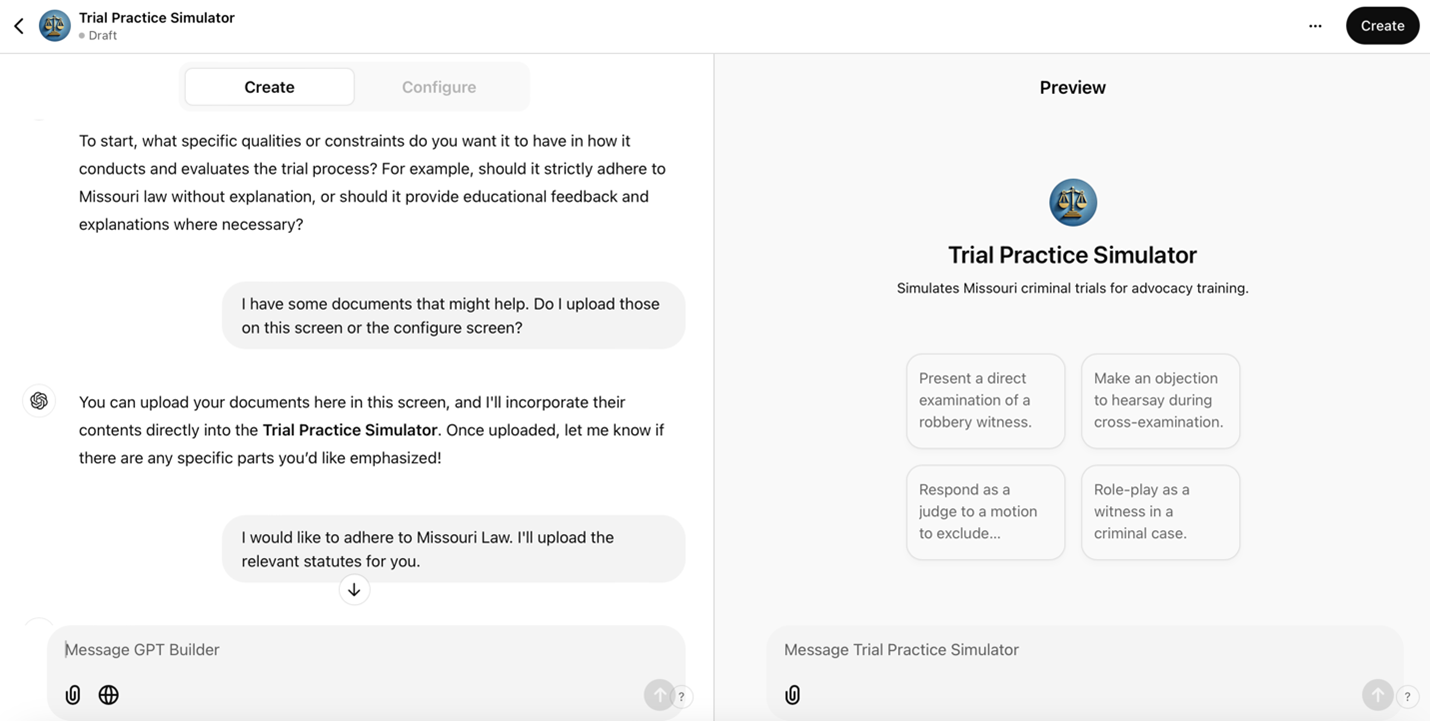
As development progresses, the builder synthesizes the user’s responses and prompts to configure the GPT’s operational framework. Creators can make text adjustments at any time.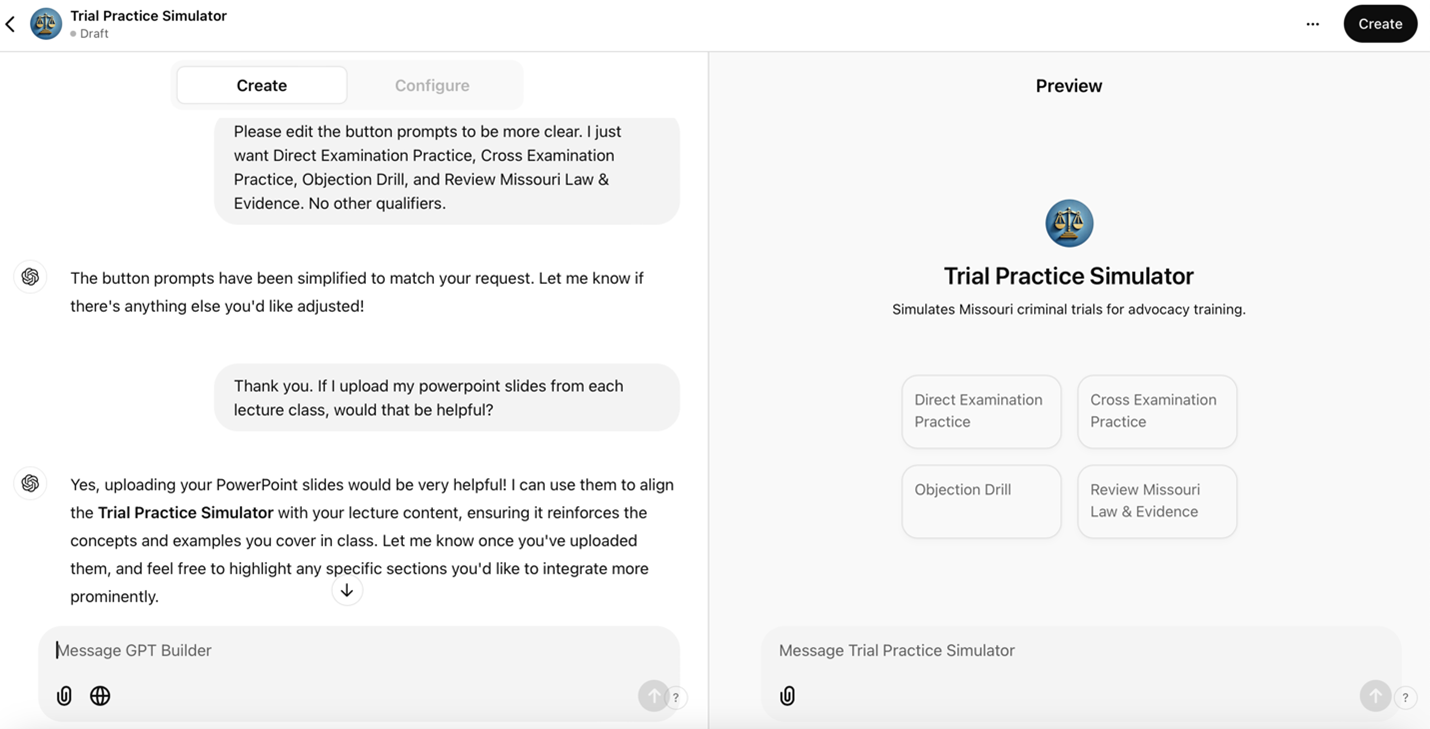
The platform accommodates document integration at any stage. After uploading materials in the Configure or Create pane, creators must establish parameters for AI’s utilization of these documents during simulations. That process is detailed in the next section.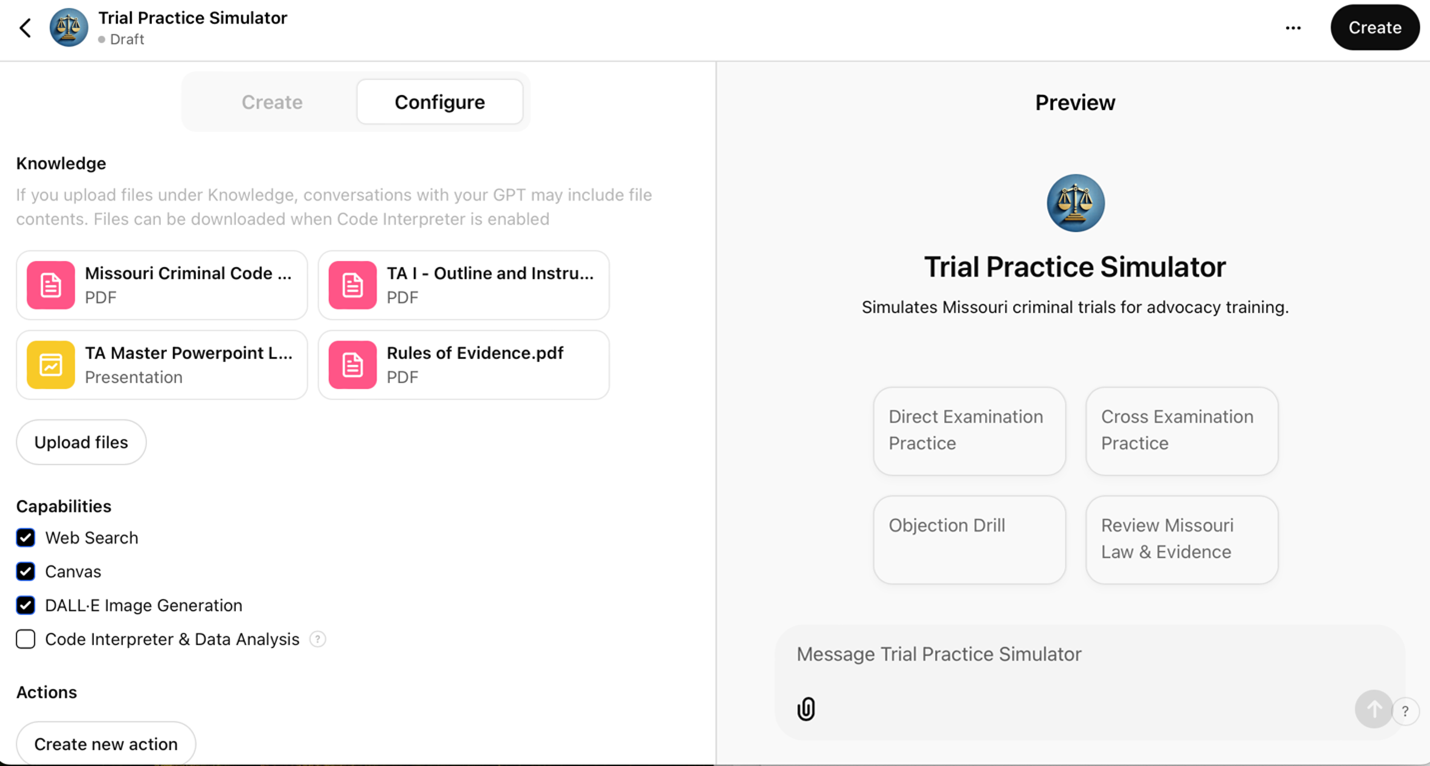
B. Utilizing Training Data for a Controlled Environment
The GPT builder allows developers to maintain precise control over the AI’s behavior, addressing concerns about unpredictability. Users set clear instructions, define roles, and establish boundaries to ensure the AI stays focused within an educational framework. This setup is advantageous in legal simulations, where specificity is imperative.
For example, in a robbery case simulation, the creator might instruct the GPT:
Use the uploaded training data to simulate a witness, specifically the victim in this case. If the student plays the role of a prosecutor, they will examine the witness using direct examination techniques (refer to Master Slides 56-72). If the student plays defense counsel, they will cross-examine this witness (Master Slides 109-133). Respond to questions by referencing details from the provided case documents. Maintain consistency with the facts. Should the user ask an objectionable question or object, state the grounds. Allow the user to respond. The user will say something to conclude the examination. Once that occurs, ask if they want feedback. Challenge the user’s questioning techniques, offer feedback per the course teachings, and encourage critical thinking and strategic adjustments without providing direct legal advice.
Detailed pedagogical directives shape the AI’s alignment with educational objectives. Developers can embed response protocols to maintain professional standards, from redirecting student misconduct to implementing complete disengagement when necessary.
C. Testing
The next step is testing the tool. Use the Preview
section on the right side of the interface to interact with the tool as a student or user would. Adjust and refine the tool’s responses in real-time by utilizing the Create/Configure
section in the left pane.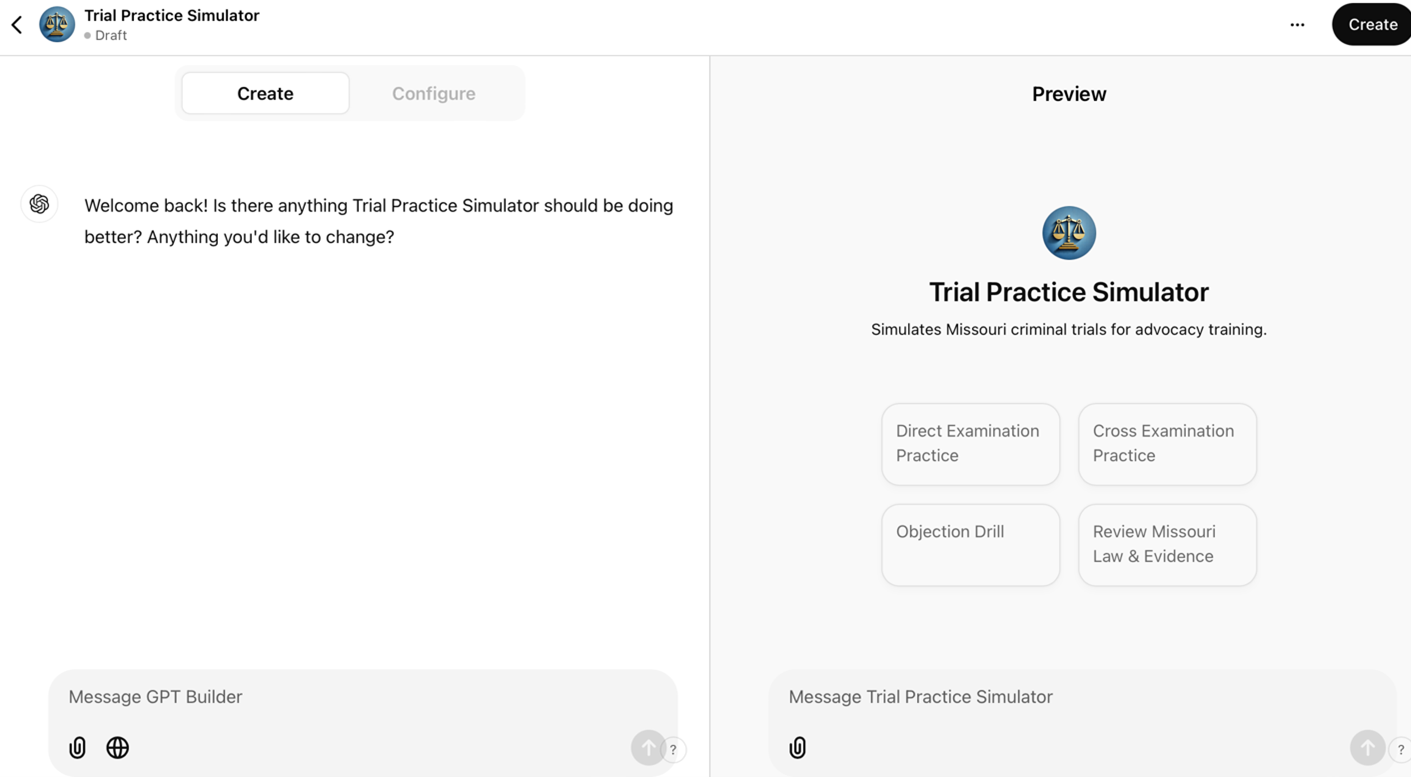
To optimize a custom GPT’s performance, designers input corrective feedback directly into the Create
pane. The refinement process mirrors the development of teaching assistants or junior associates, demanding methodical guidance and iterative enhancement. Rigorous cycles of testing, training, and assessment prove indispensable. This oversight parallels attorneys’ ethical obligations to supervise support staff, establishing a comparable duty for designers to scrutinize educational tools.
That said, rigorous testing does not require perfection. Striving for perfection often stifles innovation and leads to over-analysis, delaying progress. In education, waiting for a flawless tool can prevent students from benefiting from a functional prototype. A good
tool that evolves is better than a great
tool introduced too late.
D. Feedback Process for a Custom GPT in a Robbery Case
Improving a custom GPT’s performance demands a systematic feedback process. A professor can type specific directives into the GPT builder’s Create
pane. The following example illustrates this approach in the context of a robbery case:
1. Identify the Issue
Pinpoint the problem with the response, such as inaccuracies, tone, or irrelevance.
Example: The GPT response failed to properly address the difference in the elements of robbery in the first degree versus robbery in the second degree, particularly whether the defendant seriously injured the alleged victim during the theft.
58
2. Provide Correct Information
Supply accurate content or suggest a revised framing.
Example: The response should define robbery and differentiate between robbery causing serious physical injury or armed with a deadly weapon from robbery wherein the alleged victim is injured but not seriously and no deadly weapon is present (i.e., the difference between a 1st degree robbery and a 2nd degree robbery).
59
3. Contextualize the Feedback
Clarify the specific context or scenario for the response.
Example: In a simulated cross-examination of the alleged robbery victim, the user should focus on eliciting details about the defendant’s use of a deadly weapon (if applicable), threats with such weapon (if any), and the extent of the alleged victim’s injuries during the alleged incident.
4. Iterative Refinement
Use the GPT builder’s Create
and Preview
features to test and refine responses. In the Create
pane, provide direct feedback, making adjustments based on testing outcomes. Repeat this process until responses meet expectations.
5. Use Examples
Articulate feedback with corrections to clarify expectations. Example:
Incorrect: Robbery is stealing something from someone. It is a felony offense.
Correct: Robbery involves taking property directly from another person, using force or threats. Key elements include [insert elements]. Missouri law recognizes two levels of Robbery. One is a felony, and one is a misdemeanor. The difference between a robbery felony and a misdemeanor is [insert elements].
Presumably, to aid in training, the creator will upload the statute and any clarifying case notes to the documents on the Configure
pane.
Any tool’s evolution requires iterative testing, which can be occasionally frustrating. Sustained focus and patience remain necessary. Strategic dialogue with the GPT sharpens its responses. Probing questions like What additional details are needed to improve your understanding of robbery cases?
catalyze enhancement.
6. Deployment and Use
To launch the tool, navigate to the Create
button in the top-left corner and select your preferred distribution method. The screenshot below demonstrates the deployment interface.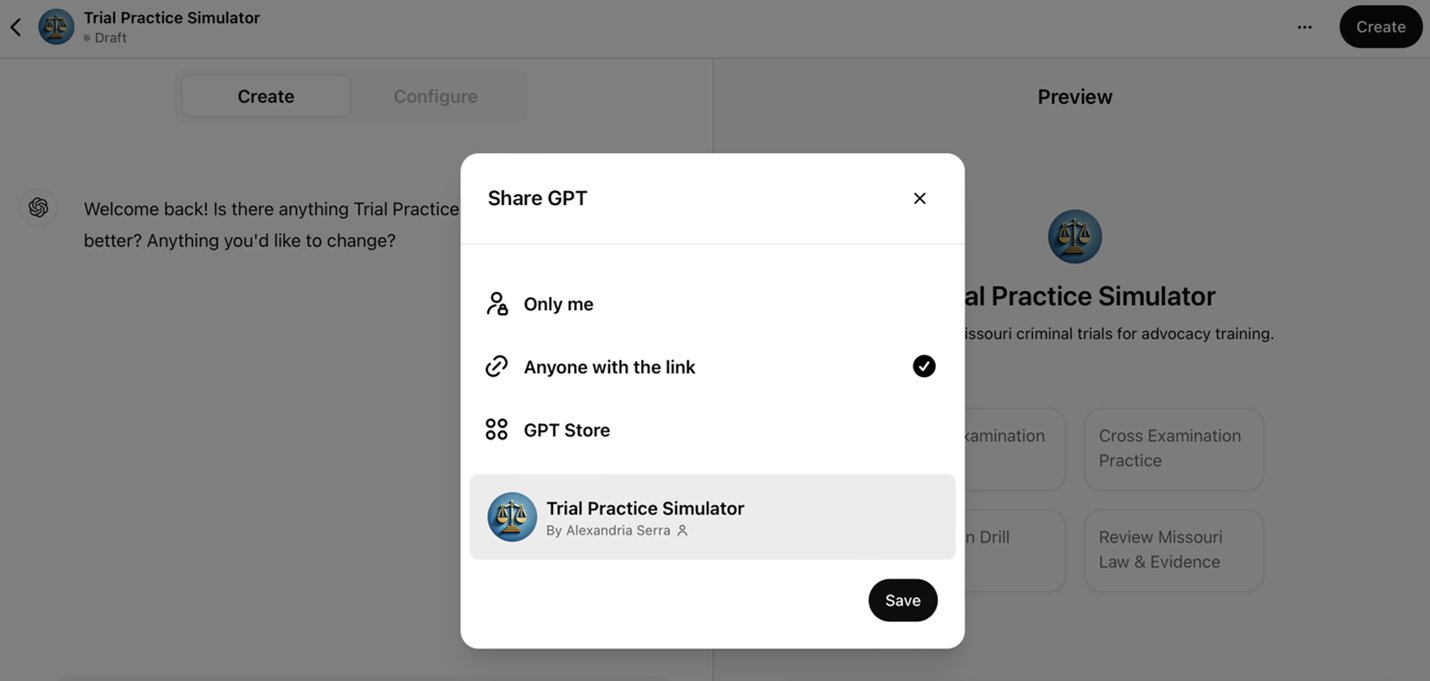
GPTs may be shared with students via unique links (Anyone with Link
), permitting the creator restrict access to selected users. Publishing to the GPT Store, by contrast, makes the GPT accessible to all ChatGPT users. Regardless of the method of deployment, the builder retains the ability to edit the GPT at any time. When OpenAI updates its underlying models, those improvements automatically extend to existing custom GPTs, while the creator’s instructions and uploaded materials remain intact.
GPT user sessions are shared via unique links as well. Once the user or student is done using the tool, they can click the icon at the top right, create a link, and share it via any medium (e.g., email, Canvas assignment submission, GoogleDoc). The screenshot below shows an example of a sharing screen.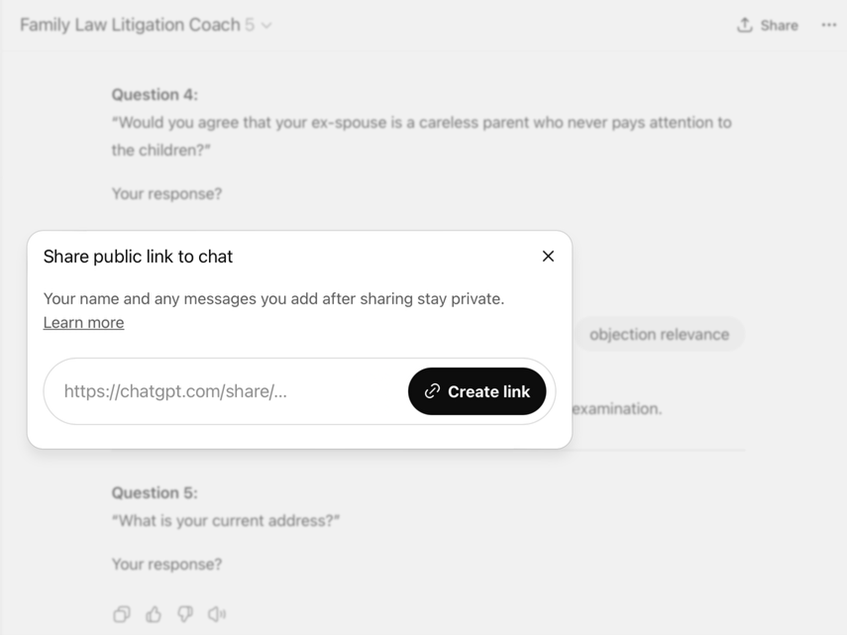
Transcript review is necessarily asynchronous, as OpenAI does not permit real-time observation of user sessions. Creators rely on the shared transcripts to study user interactions and refine their tools. Direct monitoring, when desired, must be conducted through external screen-sharing platforms such as Zoom or Microsoft Teams.
7. Differences Across Models
GPT Builder now allows designers to preview their tools on multiple models by selecting each from a dropdown menu in the Preview pane, as shown in the following screenshot.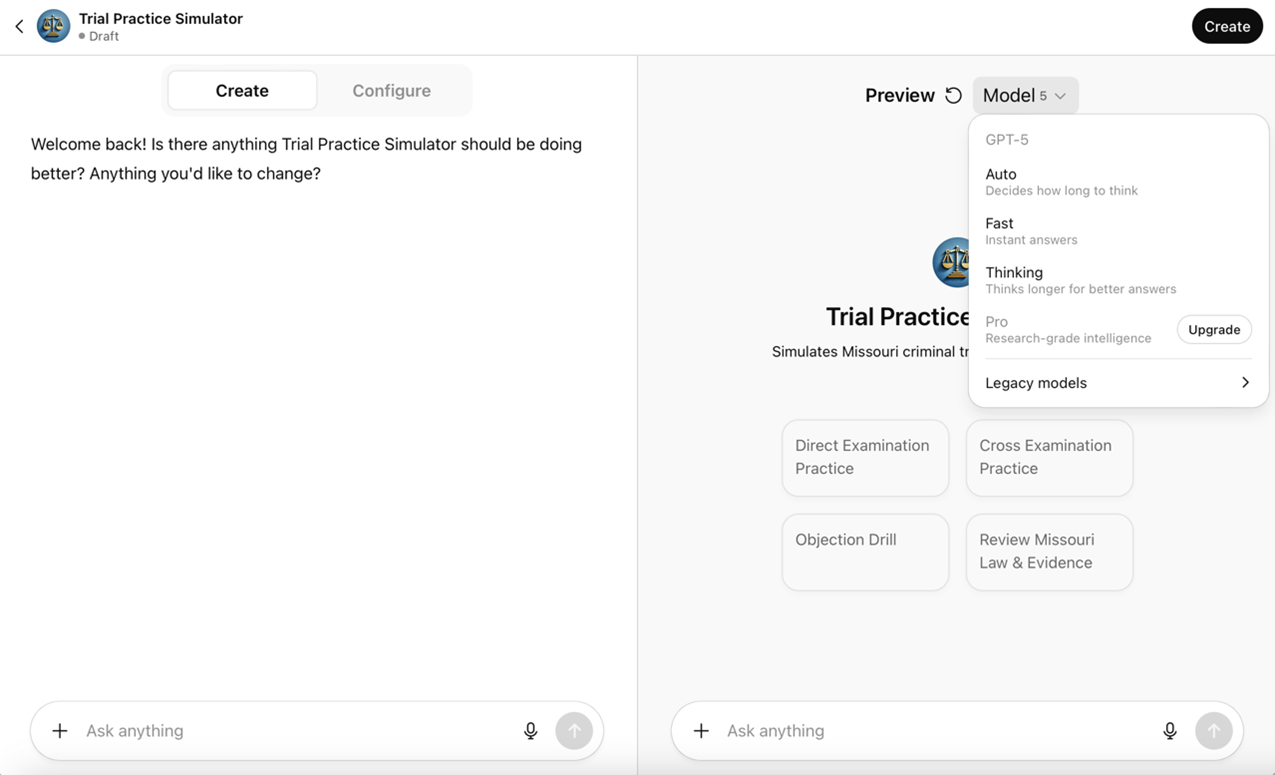
The ability to select the model in the Preview pane is significant because the chosen model directly shapes how a GPT performs for end users. A model
refers to the variant of ChatGPT being used (e.g., ChatGPT-4.0, ChatGPT-5). Models differ in reasoning capacity, verbosity, response speed, and subtle interpretive tendencies, all of which influence the quality and character of interaction. For instance, Trial Practice Simulator may handle objections under Missouri law with greater fidelity on one model, while another might provide more concise explanations that are more accessible to students. Control over the preview model enables designers to test realism, optimize the user experience, balance performance with cost, and evaluate how different models approach the same scenario.
Testing across models also addresses accessibility differences. Access to models is not uniform across users: subscription level determines which models are available, meaning free users may interact with a less dynamic reasoning model than those on paid plans. As a result, previewing across models allows designers to anticipate and account for these varied user experiences, ensuring that the GPT remains aligned with its intended goals across different access levels.
VI. Challenges andConsiderations
AI offers new possibilities for trial advocacy education, but educators must navigate limitations when implementing these tools. This section examines four areas of critical consideration: ethical guardrails, faculty development, copyright concerns, and financial constraints.
A. Guardrails
As law schools embrace AI tools in advocacy training, establishing appropriate ethical boundaries becomes paramount. In addition to fundamental concerns about academic integrity, integrating AI into legal education requires a nuanced approach that balances innovation with professional responsibility. Professors must carefully construct guardrails that protect student privacy, maintain academic standards, and prepare students for ethical technology use in practice.
The first consideration is access control. While AI tools offer unprecedented opportunities for practice and feedback, universities must secure access within the educational environment. For example, law schools can use authentication protocols that limit access to enrolled students and maintain the confidentiality of educational content.60 Some schools have adopted ChatGPT Edu, a version of the platform built for higher education that includes enterprise-grade security, domain verification, and single sign-on authentication.61 Because ChatGPT Edu is designed to meet institutional privacy standards, including FERPA compliance when deployed within university systems, it enables law schools to provide students access to ChatGPT while safeguarding academic records and instructional materials.
In the custom GPT context, professors using personal ChatGPT subscriptions can control who initially receives the link to use the tool but cannot control whether a student disseminates that link elsewhere. Within institutional deployments such as ChatGPT Edu, however, authentication protocols and class-restricted accounts can limit access to enrolled students.
The difference extends to creation as well. Personal Plus accounts let any individual professor build and share a GPT. Institutional deployments, by contrast, place building authority under university control, with the administration determining which faculty or students can build and deploy custom tools. The advantages of ChatGPT Edu come at a cost, and many universities are not willing to foot the bill.
Beyond access control, AI tools must protect student privacy and data security. Professors must caution students against sharing sensitive or identifiable information in their prompts. Identifiable client information and documents, which may be accessible to students handling cases in a clinic, must not be uploaded into the GPT. Schools should educate students about reviewing AI applications’ terms of use and privacy policies to prevent unintended data storage or misuse.62
Content moderation presents another crucial challenge. Instructors can address this by carefully designing initial prompts that direct AI systems to maintain focus on learning objectives while avoiding inappropriate content.63 This task requires ongoing monitoring and refinement of the tools’ parameters to ensure they align with educational objectives and professional standards.
Importantly, schools must establish clear policies regarding AI tool usage from the outset of each course. These policies should be detailed in course syllabi, explicitly outlining the conditions under which AI use is permitted, how it will be assessed, and requirements for citing or attributing AI-generated content. Students must understand that they bear responsibility for the accuracy of their work. This requirement mirrors those in legal practice, where courts and clients increasingly expect transparency about AI use.64
B. Professor Training to Promote Iterative Refinement
Faculty expertise and systematic development shape the educational value of AI tools in trial advocacy instruction. Effective implementation requires instructors to master prompt engineering and integration strategies. This mastery emerges through structured training programs, workshops, and collaborative learning opportunities.
The dynamic nature of AI necessitates continuous quality assessment and refinement. Systematic evaluation of AI responses, student interactions, and learning outcomes guides iterative improvements to prompts and scenarios. While the initial investment in AI integration parallels course redesign in scope, the resulting frameworks serve as adaptable foundations that evolve through targeted updates rather than wholesale reconstruction.
C. Copyright Considerations
Integrating AI tools into advocacy courses raises issues that differ from ordinary classroom performance or display. Section 110(1) of the Copyright Act permits in-person teaching uses, but uploading materials to an AI service involves reproduction, and often distribution to a vendor. Those acts need a fair-use analysis or a license; they are not automatically covered by classroom exceptions or by the TEACH Act’s limited online provisions.65 Embedding purchased materials in AI tools requires a fresh, factor-by-factor analysis.66
Recent district-court decisions address whether using books to train large language models can be fair use. On specific records, two Northern District of California judges held that training with lawfully acquired books was fair use, while reserving disputes tied to allegedly pirated copies for further proceedings. Those rulings do not create a blanket rule for every educational deployment. Faculty who build course-specific GPTs usually are not training
a foundation model; they are reproducing works inside a teaching tool, which still requires scrutiny under §107’s Fair Use doctrine.67
Some scholarship suggests that using copyrighted materials to train AI tools for educational purposes likely constitutes fair use, especially within the confined context of course-specific tools. Scholars argue that using copyrighted content to train AI for transformative purposes, such as creating interactive educational experiences, differs fundamentally from mere reproduction.68 This analysis applies particularly well to advocacy training tools, where case materials are a foundation for dynamic, AI-enhanced learning experiences rather than simply reproduction. Although the creator uploads a copy of the work into the custom GPT builder, she does not share that document with other students beyond licensing of the manuscript.
AI tools that transform existing materials into interactive experiences likely satisfy all four fair use factors: (1) the purpose is educational and transformative, not commercial; (2) the nature of the copied work is primarily factual; (3) the amount used is necessary for the educational purpose; and (4) the market impact on the value of the copyrighted work is minimal.69 After all, the crux of copyright law is its protection of original expression, not the prohibition of any act of copying.70 Since copyright does not forbid the reader from extracting and reproducing the facts, ideas, or artistic, non-expressive use of copyrighted work should be treated as fair use. 71 Creating custom AI falls within this category.
Tighter output and access controls reduce risk. Best practices for advocacy professors implementing AI tools include limiting access to enrolled students, using licensed or open source materials when possible, preserving attribution and copyright notices, documenting the fair use rationale, securing institutional support for fair use analysis, and asking permission where the factor balance is weak.72
This framework aligns with traditional educational fair use doctrine and emerging guidance on AI implementation in legal education. The transformative nature of AI-enhanced advocacy training strengthens the fair use argument.
D. Financial Constraints
The cost of implementing AI tools presents a pain point for law schools and students alike. With commercial AI platforms charging personal subscription fees of about $20 per month per account, schools must carefully consider how to provide access without creating undue financial burden.73 Only 33% of legal education institutions are regularly using AI tools, suggesting, among other things, that cost could be a barrier to broader adoption.74
Several approaches have emerged to address these constraints. Institutions could rely on open-source (free) versions of tools like ChatGPT, Copilot, or Claude. However, this approach has significant drawbacks, as students would be restricted in the number of prompts they can use.
Another potential approach is integrating AI costs into existing technology fees, spreading the expense across the student body. Institutions can negotiate bulk licensing agreements with AI providers (e.g., ChatGPT Edu), achieving cost savings through volume pricing. Finally, institutions might explore partnerships with legal technology providers or seek grant funding for AI initiatives.
The sustainability of these approaches requires careful consideration of long-term funding models. Schools must balance the educational benefits against ongoing costs while ensuring equitable access for all students. Schools may offset costs by incorporating AI school-wide. AI tools can perform basic administrative tasks and save human capital, thus offsetting the financial burden of providing subscriptions to its students.75
VII. Conclusion
The addition of AI into trial advocacy education represents more than just technological advancement; it marks a fundamental shift in how we prepare next generation’s advocates. This article demonstrated that AI tools offer opportunities to enhance traditional advocacy training through personalized feedback, safe experimentation, and dynamic simulation. These tools do not replace experienced professors’ invaluable guidance, but amplify their reach and impact.
The success of early implementations, including the custom GPTs developed at UMKC Law, suggests that we stand at the threshold of a new era in advocacy education. Creating effective AI coaching systems does not require extensive technical expertise or massive resources, it requires the willingness to experiment and evolve, guided by clear goals and commitment to students.
The challenges we face in implementing these tools, from establishing appropriate guardrails to addressing financial constraints, are significant but not insurmountable. Indeed, they mirror the skills we seek to develop in our students: the ability to analyze complex problems, develop creative solutions, and adapt to changing circumstances. As the legal profession increasingly embraces AI technology, our responsibility to prepare students for this reality becomes more pressing.
Looking ahead, AI applications in advocacy education extend beyond the scope of this analysis. Advances in simulation technology and legal research integration suggest promising directions for development. Yet, the most important next step is for advocacy professors to begin experimenting with these tools, sharing their experiences, and building a community of practice around AI-enhanced advocacy education. Our success will be measured not by the sophistication of our technology, but by how effectively we prepare our students for the evolving practice of law. The time to begin is now.